# General Slicer

## Content

You can create a general slicer with the [GeneralSlicerData](/spreadjs/api/v16/classes/GC.Spread.Slicers.GeneralSlicerData) class. A general slicer is used to process data for a two-dimensional array and provides properties and methods that you can use to filter the data and get the filtered result. You can attach multiple slicers to a general slicer. Each slicer can filter one column of data. After the filter is complete, the other slicers are notified by the [GeneralSlicerData](/spreadjs/api/v16/classes/GC.Spread.Slicers.GeneralSlicerData) class. The slicers then can get the filtered result from **GeneralSlicerData** and update their UI.

> **Note:** To work with general slicers in a SpreadJS worksheet, you need to reference the `gc.spread.sheets.all.js` plugin.

The slicer works with the [GeneralSlicerData](/spreadjs/api/v16/classes/GC.Spread.Slicers.GeneralSlicerData) class based on the following steps:

1. Create a new **GeneralSlicerData** with your data.
2. Create a new custom slicer and attach it to **GeneralSlicerData**.
3. Get the column data from **GeneralSlicerData** and build the slicer UI.
4. Respond to the UI events and invoke the GeneralSlicerData [doFilter](/spreadjs/api/v16/classes/GC.Spread.Slicers.GeneralSlicerData#doFilter) method.
5. Get the filtered result from **GeneralSlicerData** and update the slicer UI.

The GeneralSlicerData class provides the following methods to help control general slicers.

* Get all the data for a specific column with the [getData](/spreadjs/api/v16/classes/GC.Spread.Slicers.GeneralSlicerData#getData) method.
* Get exclusive (non-repeating data) with the [getExclusiveData](/spreadjs/api/v16/classes/GC.Spread.Slicers.GeneralSlicerData#getExclusiveData) method.
* Filter a column with the [doFilter](/spreadjs/api/v16/classes/GC.Spread.Slicers.GeneralSlicerData#doFilter) method.
* Clear the filter information with the [doUnfilter](/spreadjs/api/v16/classes/GC.Spread.Slicers.GeneralSlicerData#doUnfilter) method.

For a complete list of methods, see the [GeneralSlicerData](/spreadjs/api/v16/classes/GC.Spread.Slicers.GeneralSlicerData) class.
You can attach a listener to **GeneralSlicerData** with the [attachListener](/spreadjs/api/v16/classes/GC.Spread.Slicers.GeneralSlicerData#attachListener) function and detach it with the [detachListener](/spreadjs/api/v16/classes/GC.Spread.Slicers.GeneralSlicerData#detachListener) function.
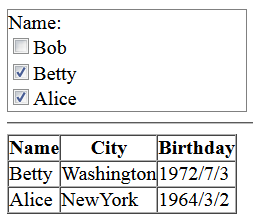
The following image displays a custom slicer.
![](https://gcdocumentsitekrblob.blob.core.windows.net/document-site-files/images/8d606653-16a0-474d-b9dc-e2b4d01c2446/images/customslicer.png)
The following code sample creates a general slicer.

```JavaScript
<!DOCTYPE html>
<html>
<head>
    <meta charset="utf-8" />
    <meta name="viewport" content="width=device-width, initial-scale=1.0" />
    <script src="https://code.jquery.com/jquery-2.1.1.min.js" type="text/javascript"></script>
    <!--CSS files-->
    <link href="scripts/gc.spread.sheets.excel2013white.x.x.x.css" rel="stylesheet" />
    <!--Script files-->
    <script type="text/javascript" src="scripts/gc.spread.sheets.all.x.x.x.min.js"></script>
    <script type="text/javascript">
        //Define data source.
        columnNames = ["Name", "City", "Birthday"];
        data = [
            ["Bob", "NewYork", "1968/6/8"],
            ["Betty", "Washington", "1972/7/3"],
            ["Alice", "NewYork", "1964/3/2"]];
        //Define custom slicer.
        function MySlicer(container) {
            this.container = container;
            this.slicerData = null;
            this.columnName = null;
        }
        MySlicer.prototype.setData = function (slicerData, columnName) {
            this.slicerData = slicerData;
            this.columnName = columnName;
            this.slicerData.attachListener(this);
            this.onDataLoaded();
        }
        MySlicer.prototype.onDataLoaded = function () {
            //create slicer dom tree.
            var columnName = this.columnName,
                exclusiveData = this.slicerData.getExclusiveData(columnName);
            $(this.container).append($('<span>' + this.columnName + ':</span>' + '<br />'));
            var domString = "";
            for (var i = 0; i < exclusiveData.length; i++) {
                domString += '<input type="checkbox" name="' + columnName + '" value="' + exclusiveData[i] + '">';
                domString += '<span>' + exclusiveData[i] + '</span>';
                domString += '<br />';
            }
            $(this.container).append($(domString));
            //attach events to dom.
            var self = this;
            $("[name='" + self.columnName + "']").change(function () {
                var slicer = self,
                    exclusiveData = slicer.slicerData.getExclusiveData(slicer.columnName),
                    parent = $(this).parent(),
                    items = parent.children(),
                    indexes = [];
                for (var i = 0, length = items.length; i < length; i++) {
                    if (items[i].checked) {
                        var value = items[i].value;
                        if (!isNaN(parseInt(value))) {
                            value = parseInt(value);
                        }
                        indexes.push(exclusiveData.indexOf(value))
                    }
                }
                if (indexes.length === 0) {
                    slicer.slicerData.doUnfilter(slicer.columnName);
                } else {
                    slicer.slicerData.doFilter(slicer.columnName, { exclusiveRowIndexes: indexes });
                }
            });
        };
        MySlicer.prototype.onFiltered = function () {
            //The following is an example of showing the filtered result.
            var slicerdata = this.slicerData;
            var filteredRowIndexs = slicerdata.getFilteredRowIndexes();
            var trs = $listTable.find("tr");
            for (var i = 0; i < slicerdata.data.length; i++) {
                if (filteredRowIndexs.indexOf(i) !== -1) {
                    $(trs[i + 1]).show();
                } else {
                    $(trs[i + 1]).hide();
                }
            }
        }
        //Define the show filtered result method.
        function initFilteredResultList() {
            var tableStr = "<table border='1' cellpadding='0' cellspacing='0'><tr>";
            for (var i = 0; i < columnNames.length; i++) {
                tableStr += "<th>" + columnNames[i] + "</th>";
            }
            tableStr += "</tr>";
            for (var i = 0; i < data.length; i++) {
                tableStr += "<tr>";
                for (var j = 0; j < data[i].length; j++) {
                    tableStr += "<td>" + data[i][j] + "</td>";
                }
                tableStr += "</tr>";
            }
            tableStr += "</table>";
            $listTable = $(tableStr);
            $("#list").append($listTable);
        }
        $(document).ready(function () {
            //init filtered result list.
            initFilteredResultList();
            //create a custom slicer and add this slicer to the "slicerContainer" div.
            var slicer = new MySlicer($("#slicerContainer")[0]);
            var slicerData = new GC.Spread.Slicers.GeneralSlicerData(data, columnNames);
            slicer.setData(slicerData, "Name");
        });
    </script>
</head>
<body>
    <div id="slicerContainer" style="border:1px solid gray;width:190px"></div>
    <hr />
    <div id="list" style="width:300px;float:left"></div>
</body>
</html>
```

> **Note:** To upgrade to the new slicers, see [Breaking Changes](/spreadjs/docs/v16/rnotes/release-notes-for-version-1520).