# TableSheet
## Content
TableSheet is a fast, data-bound table view with grid-like behavior, a spreadsheet user interface and calculation engine which uses the Data Manager to pull data from the server, interact with it and then creates a view of the fetched data to bind to a tablesheet.
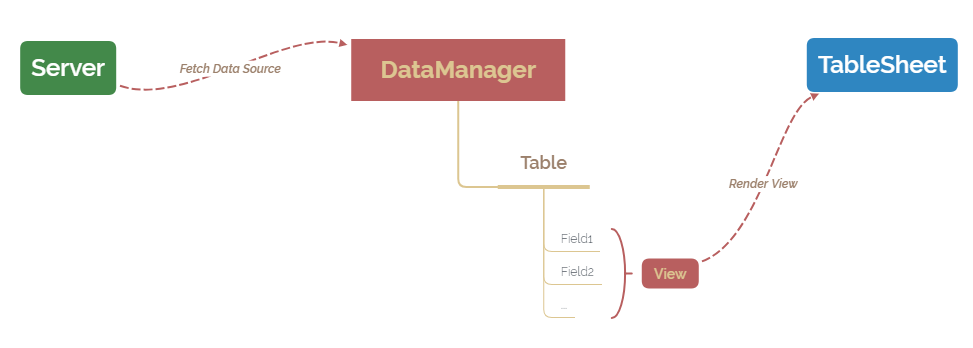
The main benefits of using a tablesheet are described below:
* Better sheet-binding resulting in better performance in sort and filter.
* Support group blocks with group-level calculations and slicers.
* Runtime panels to allow adjusting columns and groups.
* Conditional formatting and rules based on bound data instead of spreadsheet cell values.
A tablesheet can be created using the [GC.Spread.Sheets.TableSheet.TableSheet](/spreadjs/api/v16/classes/GC.Spread.Sheets.TableSheet.TableSheet) and [GC.Data.DataManager](/spreadjs/api/v16/classes/GC.Data.DataManager) classes. The Data Manager is a powerful local data engine which interacts with the database to pull data, manage it and to sync real time data back to database and it then creates a view of the fetched data to bind it to a tablesheet.
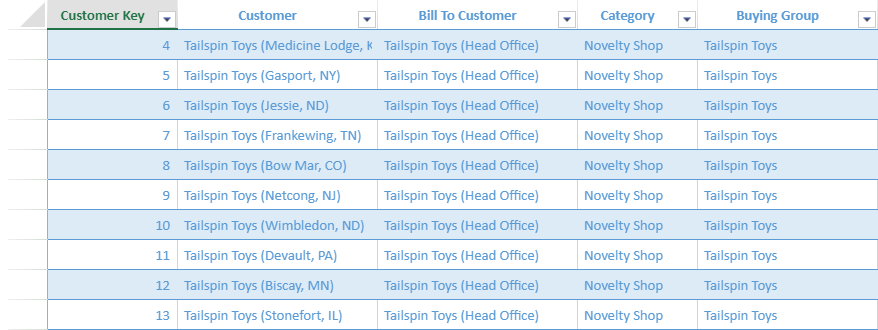
The following image shows a tablesheet created for a goods importer and distributor company.
## TableSheet Features
For using tablesheet and its various features, refer the below topics:
| Features | Description |
| -------- | ----------- |
| [TableSheet Components](/spreadjs/docs/v16/features/tablesheet/tablesheet-components) | Describe tablesheet structure, and its components. |
| [Data Manager](/spreadjs/docs/v16/features/tablesheet/data-manager) | Describe the working of Data Manager and its methods. |
| [Create TableSheet](/spreadjs/docs/v16/features/tablesheet/create-tablesheet) | Create tablesheet in the spreadsheet through code. |
| [TableSheet Views](/spreadjs/docs/v16/features/tablesheet/tablesheet-views) | Control and customize the display of tablesheet columns:- [Column Header Style](/spreadjs/docs/v16/features/tablesheet/tablesheet-components)
- [Column header fit mode](/spreadjs/docs/v16/features/tablesheet/tablesheet-views#column-header-fit-mode)
- [Cell types and dropdowns](/spreadjs/docs/v16/features/tablesheet/tablesheet-views#cell-types-and-dropdowns)
|
| [Data Operations](/spreadjs/docs/v16/features/tablesheet/data-operations) | Edit the data source efficiently with different sync modes. |
| [TableSheet Relationships](/spreadjs/docs/v16/features/tablesheet/tablesheet-relationships) | Define and create table and field relationships with Data Manager. |
| [TableSheet Operations](/spreadjs/docs/v16/features/tablesheet/tablesheet-operations) | Perform different types of operations on a tablesheet:- [Pin Unpin](/spreadjs/docs/v16/features/tablesheet/tablesheet-operations/tablesheet-pin-unpin)
- [Sort and Filter](/spreadjs/docs/v16/features/tablesheet/tablesheet-operations/tablesheet-sort-filter)
- [Row Action](/spreadjs/docs/v16/features/tablesheet/tablesheet-operations/tablesheet-row-action)
- [Grouping](/spreadjs/docs/v16/features/tablesheet/tablesheet-operations/tablesheet-grouping)
|
| [Rules](/spreadjs/docs/v16/features/tablesheet/tablesheet-rules) | Manage rules like conditional formatting and style rules in a tablesheet. |
| [Appearance](/spreadjs/docs/v16/features/tablesheet/tablesheet-appearance) | Customize the appearance of a tablesheet:- [Alternate row styles](/spreadjs/docs/v16/features/tablesheet/tablesheet-appearance#alternate-row-styles)
- [Icons](/spreadjs/docs/v16/features/tablesheet/tablesheet-appearance#icons)
- [Themes](/spreadjs/docs/v16/features/tablesheet/tablesheet-appearance#themes)
|
| [Calculations](/spreadjs/docs/v16/features/tablesheet/tablesheet-calculations) | Utilize the enhanced calculation engine to add calculated columns and reference tablesheet in a worksheet. |
| [Interactive Behavior](/spreadjs/docs/v16/features/tablesheet/tablesheet-interactive-behavior) | Interact with the tablesheet with different actions:- [Zoom In and Out](/spreadjs/docs/v16/features/tablesheet/tablesheet-interactive-behavior#zoom-in-and-out)
- [Resize Columns](/spreadjs/docs/v16/features/tablesheet/tablesheet-interactive-behavior#resize-columns)
- [Cut, Copy and Paste](/spreadjs/docs/v16/features/tablesheet/tablesheet-interactive-behavior#cut-copy-and-paste)
- [Drag Operations](/spreadjs/docs/v16/features/tablesheet/tablesheet-interactive-behavior#drag-operations)
- [Shortcut Keys](/spreadjs/docs/v16/features/tablesheet/tablesheet-interactive-behavior#shortcut-keys)
|
| [TableSheet IO](/spreadjs/docs/v16/features/tablesheet/tablesheet-io) | Export tablesheet to different file formats:- [JSON serialization](/spreadjs/docs/v16/features/tablesheet/tablesheet-io#json-serialization)
- [Excel files](/spreadjs/docs/v16/features/tablesheet/tablesheet-io#export-excel-files)
- [PDF](/spreadjs/docs/v16/features/tablesheet/tablesheet-io#export-pdf)
- [Print](/spreadjs/docs/v16/features/tablesheet/tablesheet-io#print-tablesheet)
|