# Row Action
## Content
TableSheet provides special columns on the row header to show status and perform row operations from the UI.
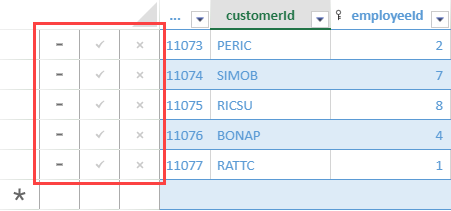
The following built-in row actions from the **BuiltInRowActions** class can be enabled using the [TableSheet.rowActionOptions](/spreadjs/api/v16/classes/GC.Spread.Sheets.TableSheet.TableSheet#rowActionOptions) method -
| Name | Description |
| ---- | ----------- |
| `pinRow` | Pin a row. |
| `dirtyStatus` | Show the data changes in a row. |
| `warningInfo` | Show warning information in a row. |
| `removeRow` | Remove a row. |
| `saveRow` | Save the data changes in a row. |
| `resetRow` | Reset the data changes in a row. |
The following code sample shows how to enable row actions in a TableSheet.
```javascript
//init a tablesheet
var sheet = spread.addSheetTab(0, "TableSheet1", GC.Spread.Sheets.SheetType.tableSheet);
// Initialize and row actions
var rowActions = GC.Spread.Sheets.TableSheet.BuiltInRowActions;
let options = sheet.rowActionOptions();
options.push(
rowActions.removeRow,
rowActions.saveRow,
rowActions.resetRow,
);
sheet.rowActionOptions(options);
```
## Custom Actions
You can customize row actions by passing self-defined options in the rowActionsOptions method. For example, the following GIF illustrates custom row actions such as a checkbox and a comment popup.
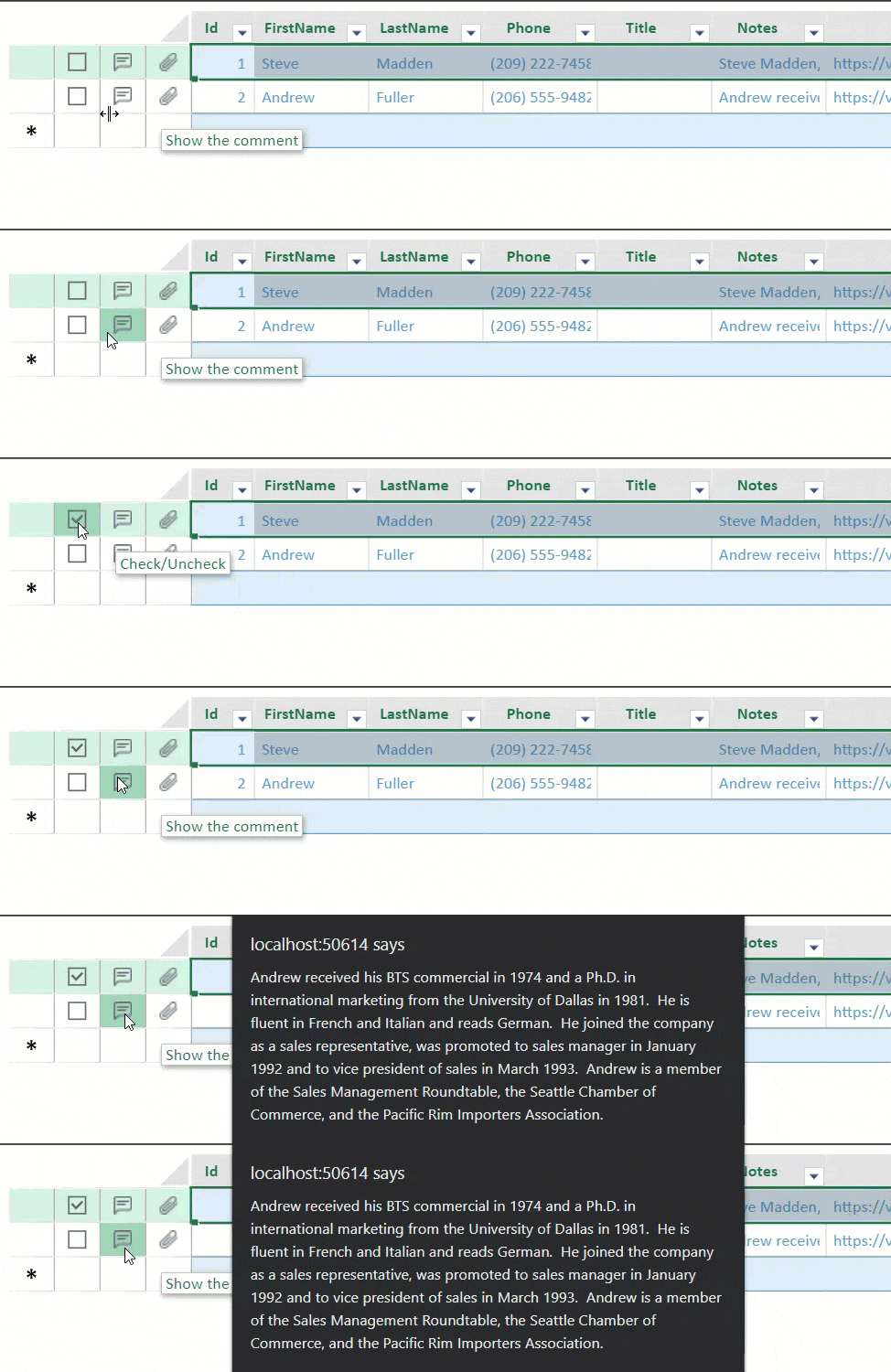
The following properties are available and can be used to customize row actions.
| Property | Description |
| -------- | ----------- |
| name
*string* | The name of the option. |
| icons
*\(string \| GC\.Spread\.Sheets\.ButtonImageType\)* | A series of icons indicate the different statuses. |
| iconSelector
*\(item: any\, index: number\) =\> number \| boolean* | Select an icon according to a different status. |
| tooltip
*String* | The tooltip for the row action. |
| command
*string* | The name of the command when clicking the row action. |
| shortcutKey
*GC.Spread.Sheets.TableSheet.IShortcutKey* | The shortcut key of the command for the row action. |
The following code sample shows how to create a custom row action in tablesheet.
```javascript
function addCustomActions(sheet){
var options = sheet.rowActionOptions();
//add a action of check/uncheck
options.push({
name: 'check',
icons: ["data:image/svg+xml;base64,PHN2ZyB3aWR0aD0iMTIiIGhlaWdodD0iMTIiIHZpZXdCb3g9IjAgMCAxMiAxMiIgZmlsbD0ibm9uZSIgeG1sbnM9Imh0dHA6Ly93d3cudzMub3JnLzIwMDAvc3ZnIj4KPHJlY3Qgd2lkdGg9IjEyIiBoZWlnaHQ9IjEyIiBmaWxsPSJ0cmFuc3BhcmVudCIvPgo8cmVjdCB3aWR0aD0iMTIiIGhlaWdodD0iMTIiIGZpbGw9InRyYW5zcGFyZW50Ii8+CjxwYXRoIGZpbGwtcnVsZT0iZXZlbm9kZCIgY2xpcC1ydWxlPSJldmVub2RkIiBkPSJNMTIgMEgwVjEySDEyVjBaTTEgMTFWMUgxMVYxMUgxWiIgZmlsbD0iIzY2NjY2NiIvPgo8L3N2Zz4K", "data:image/svg+xml;base64,PHN2ZyB3aWR0aD0iMTIiIGhlaWdodD0iMTIiIHZpZXdCb3g9IjAgMCAxMiAxMiIgZmlsbD0ibm9uZSIgeG1sbnM9Imh0dHA6Ly93d3cudzMub3JnLzIwMDAvc3ZnIj4KPHJlY3Qgd2lkdGg9IjEyIiBoZWlnaHQ9IjEyIiBmaWxsPSJ0cmFuc3BhcmVudCIvPgo8cmVjdCB3aWR0aD0iMTIiIGhlaWdodD0iMTIiIGZpbGw9InRyYW5zcGFyZW50Ii8+CjxwYXRoIGZpbGwtcnVsZT0iZXZlbm9kZCIgY2xpcC1ydWxlPSJldmVub2RkIiBkPSJNMTIgMEgwVjEySDEyVjBaTTEgMTFWMUgxMVYxMUgxWiIgZmlsbD0iIzY2NjY2NiIvPgo8cGF0aCBkPSJNNS4yNSA5TDIgNS42MTI5TDMuMDA3MTQgNC41NjMyOEw1LjI1IDYuODkzM0w4Ljk4NTcxIDNMMTAgNC4wNDk2M0w1LjI1IDlINS4yNVoiIGZpbGw9IiM2NjY2NjYiLz4KPC9zdmc+Cg=="],
tooltip: "Check/Uncheck",
iconSelector: function (item) {
return !!checkMap[item.id];
},
command: CheckRow
});
//show the comment flag if the data has a comment
options.push({
name: 'comment',
icons: ["data:image/png;base64,iVBORw0KGgoAAAANSUhEUgAAAAwAAAAMCAYAAABWdVznAAAABmJLR0QA/wD/AP+gvaeTAAAAqklEQVQokZWPLQ7CUBCEv759lkMggAMQPAKN5QLNpj0BZ+gJ2tSiuAUag4ZKEi6ApW8xUAhJfxi3m29mMpGqpkAGjOjWHdh6IBORRZ7n5y46TdNZXddHVNV6khupqvmv4wJMWtiqLMspQGN4P/rU11D9Bv3d4IZAL0XAZ3Qcx3MRWbXRZjYGTh4gSZJlCGFvZjsze7R4biKy9gAhhL1zblMUxWHIhutQGOAJuws9bfdnMH0AAAAASUVORK5CYII="],
tooltip: "Show the comment",
iconSelector: function (item) {
return item.notes ? item.notes.length > 0 : false;
},
shortcutKey: { key: 65 /* A */, ctrl: true, alt: true },
command: ShowComment
});
//show the attachment flag if the data has a attachment
options.push({
name: 'attachment',
icons: ["data:image/png;base64,iVBORw0KGgoAAAANSUhEUgAAAAwAAAAMCAQAAAD8fJRsAAAAAmJLR0QA/4ePzL8AAADYSURBVBgZVcEtS4NhGIbha7KyGZZMZifIDA4/GCgWP7pYRQTv834MhoFhYnmwW4ZJmEwQRCxaDIaBNs268b4q6j9xKmPuODTI13nli5oGeeApjJK3xzCrPtvzBwrq4sZW1UO0OytuL0i+y33M6lfGjuzaJ2j7su3TsqKdqStjdS6YJLElIrc74zz7muKQn/uJzZB6xep2FUp0WJFEjVOvkFKmQTNMkTCvH7xvDJNS9kuOmSP1af3ho5qjxSfRFklCST0c0qjmyLNJx8fUF7Mc8MIbza0R/fMNfN1QmAjSSbsAAAAASUVORK5CYII="],
tooltip: "Attachment",
iconSelector: function (item) {
return item.photoUrl ? item.photoUrl.length > 0 : false;
}
});
sheet.rowActionOptions(options);
}
```