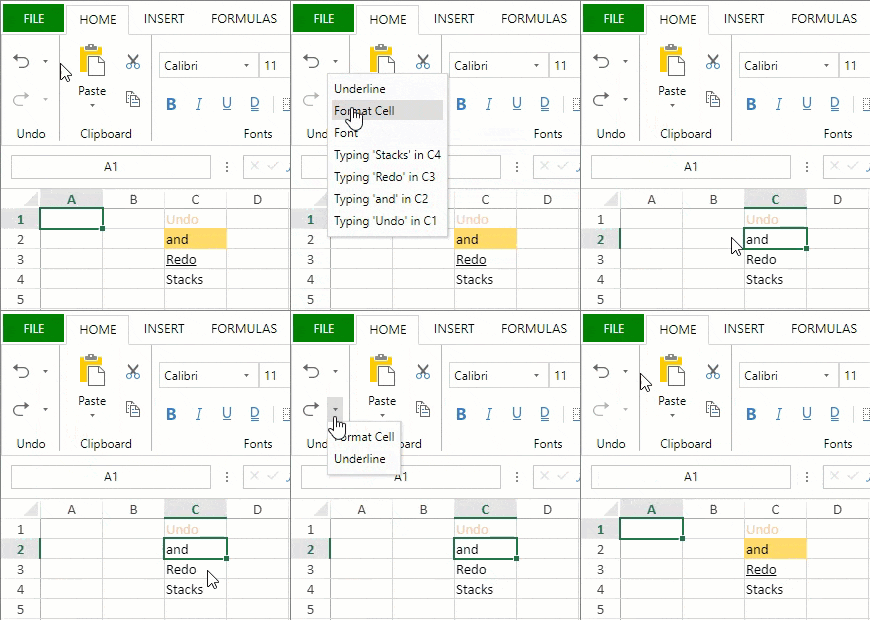
# Undo and Redo
## Content
You can use Ctrl + Z to undo an action in the widget. You can then use Ctrl + Y to redo the action you canceled.
You can undo the following types of actions:
- Editing text
- Autofit when double-clicking
- Resizing headers
- Dragging columns or rows with the mouse
- Expanding or collapsing groups with the group button
- Editing the sheet tab name by double-clicking on the tab strip
- Using Ctrl + V to paste
- Using the [Commands](/spreadjs/api/v16/modules/GC.Spread.Sheets.Commands) class to execute an action
- Context menu operations are executed in the viewport area.
The following actions do not respond to Ctrl + Z:
- Sorting or filtering with the drop-down button
- Selecting a range
- Navigating to a specific cell
- Scrolling
- Resizing the tab strip resize box
- Clicking the new tab option on the tab strip
- Context menu operations executed in the sheet tab area.
- Invoking the Workbook [fromJSON](/spreadjs/api/v16/classes/GC.Spread.Sheets.Workbook#fromJSON) method or the Worksheet [fromJSON](/spreadjs/api/v16/classes/GC.Spread.Sheets.Worksheet#fromJSON) method in the [CommandManager](/spreadjs/api/v16/classes/GC.Spread.Commands.CommandManager) [execute](/spreadjs/api/v16/classes/GC.Spread.Commands.CommandManager#execute) class method.
- Invoking the [UndoManager](/spreadjs/api/v16/classes/GC.Spread.Commands.UndoManager) [Undo](/spreadjs/api/v16/classes/GC.Spread.Commands.UndoManager#undo) and [Redo](/spreadjs/api/v16/classes/GC.Spread.Commands.UndoManager#redo) class methods in the [CommandManager](/spreadjs/api/v16/classes/GC.Spread.Commands.CommandManager) [execute](/spreadjs/api/v16/classes/GC.Spread.Commands.CommandManager#execute) class method.
You can prevent or allow the undo action in code with the **options.allowUndo** property.
After setting the allowUndo property to true, you can undo or redo an action by using the [startTransaction](/spreadjs/api/v16/modules/GC.Spread.Sheets.Commands#startTransaction) method, [undoTransaction](/spreadjs/api/v16/modules/GC.Spread.Sheets.Commands#undoTransaction) and the [endTransaction](/spreadjs/api/v16/modules/GC.Spread.Sheets.Commands#endTransaction) methods.
## Using Code
This example sets the **options.allowUndo** property and specifies an action.
```javascript
spread.options.allowUndo = true;
spread.commandManager().execute({cmd: "outlineRow", sheetName: activeSheet.name(), index: 3, count: 5});
```
This example changes the background color of a cell using the [startTransaction](/spreadjs/api/v16/modules/GC.Spread.Sheets.Commands#startTransaction) method, [undoTransaction](/spreadjs/api/v16/modules/GC.Spread.Sheets.Commands#undoTransaction) and the [endTransaction](/spreadjs/api/v16/modules/GC.Spread.Sheets.Commands#endTransaction) methods.
```javascript
var command = { canUndo: true, execute: function (context, options, isUndo)
{
var Commands = GC.Spread.Sheets.Commands;
if (isUndo)
{
Commands.undoTransaction(context, options);
return true;
}
else
{
Commands.startTransaction(context, options);
var sheet = context.getSheetFromName(options.sheetName);
var cell = sheet.getCell(options.row, options.col);
cell.backColor(options.backColor);
Commands.endTransaction(context, options);
return true;
}
}
};
var spread = GC.Spread.Sheets.findControl(document.getElementById("sampleDiv"));
var commandManager = spread.commandManager();
commandManager.register("changeBackColor", command);
commandManager.execute({ cmd: "changeBackColor", sheetName: spread.getSheet(0).name(), row: 1, col: 2, backColor: "red" });
```
## Limit the Number of Undo and Redo Operations
You can set a limit on the number of undo and redo operations by controlling the undo and redo stack size. The **maxSize** method in undoManager class can be used to do the same. This helps in increasing the application performance by reducing memory consumption.
>**Note:** If an invalid value is passed to the maxSize method, undoManager is returned.
```javascript
var spread = GC.Spread.Sheets.findControl(document.getElementById('ss'));
let undoManager = spread.undoManager();
undoManager.maxSize(20); // set max size.
let maxSize = undoManager.maxSize(); // get max size.
```
## Get Undo and Redo Stack
You can use **getUndoStack** and **getRedoStack** functions to retrieve the undo and redo stacks. These functions return the stacks as objects including the string values for sheet names and commands.
```javascript
function getUndoStackFunction() {
console.log(spread.undoManager().getUndoStack());
}
function getRedoStackFunction() {
console.log(spread.undoManager().getRedoStack());
}
```
You can also use these functions to create custom menus and display the list of undo and redo operations in the spreadsheet.
```html
```
The SpreadJS Designer displays the undo and redo stacks as the list of operations in a dropdown list. You can select any operation to navigate the spreadsheet at that specific point.