# TEXTSPLIT
## Content
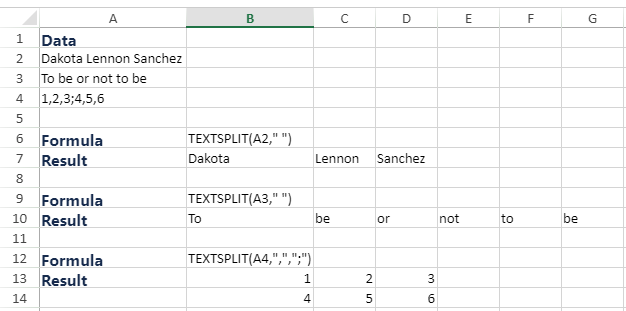
This function splits text strings by using column and row delimiters.
## Syntax
`=TEXTSPLIT(text,col_delimiter,[row_delimiter],[ignore_empty], [match_mode], [pad_with])`
## Arguments
The function has the following arguments:
| Argument | Description |
| -------- | ----------- |
| *text* | Refers to the text you want to split. |
| *col\_delimiter* | Refers to the text that marks the point where to spill the text across columns. |
| *row\_delimiter* | [Optional] Refers to the text that marks the point where to spill the text down rows. |
| *ignore\_empty* | [Optional] Specify FALSE to create an empty cell when two delimiters are consecutive. Defaults to TRUE, which creates an empty cell. |
| *match\_mode* | [Optional] Searches the text for a delimiter match. By default, a case-sensitive match is done. |
| *pad\_with* | [Optional] Refers to the value with which to pad the result. The default is #N/A. |
## Data Types
Returns string data.
## Remarks
An array constant must be used if there is more than one delimiter. For example, to split by both a comma and a period, use =TEXTSPLIT(A1,{",","."}).
## Examples