# Print Sheets
## Content
You can print a single sheet or all the sheets in SpreadJS.
The following content is printed when you print in SpreadJS:
* Visible rows or columns in the corner, row header, column header, or viewport
* Cell text
* Cell Style
* Spans
* Overflow
The following information is not printed:
* Hidden rows or columns
* Floating object
* Comment
* Tab strip
* Scroll bar
* Group
* Filter button
* Validation button or highlight circle
* Active effect
* Selection
* Freeze line
Use the [print](/spreadjs/api/v17/classes/GC.Spread.Sheets.Workbook#print) method to print a sheet or sheets. Use an index to specify a specific sheet or no index for all visible sheets. You can specify many print options with the [PrintInfo](/spreadjs/api/v17/classes/GC.Spread.Sheets.Print.PrintInfo) class such as whether to print headers, borders, grid lines, and so on.
The following table displays the options that can be used when creating a print header or footer:
| **Control Character** | **Description** | **Example** | **Result** |
| ----------------- | ----------- | ------- | ------ |
| & | Escape character | | |
| P | Current page | `sheet.printInfo().headerLeft("This is page &P of &N pages.");` | This is page 1 of 10 pages. (If there are 10 pages and this is the first page.) |
| N | Page count | `sheet.printInfo().headerLeft("This is page &P of &N pages.");` | This is page 1 of 10 pages. (If there are 10 pages and this is the first page.) |
| D | Current date | `sheet.printInfo().headerLeft("It is &D.");` | It is 2015/6/19. (If today is June 19, 2015.) |
| T | Current time | `sheet.printInfo().headerLeft("It is &T."` | It is 16:30:36. (If 16:30:36 is now.) |
| G | Image | `var printInfo = new GC.Spread.Sheets.Print.PrintInfo();`
`printInfo.headerLeft("&G");`
`printInfo.headerLeftImage("logo.jpg");` | Displays an image. |
| S | Strikethrough | `sheet.printInfo().headerLeft("&SThis is text.");` | ~~This is text.~~ |
| U | Underline | `sheet.printInfo().headerLeft("&UThis is text.");` |  |
| B | Bold | `sheet.printInfo().headerLeft("&BThis is text.");` | **This is text.** |
| I | Italic | `sheet.printInfo().headerLeft("&IThis is text.");` | *This is text.* |
| | Font Size | `sheet.printInfo().headerLeft("&36This is text.");` | 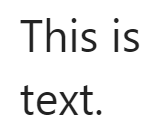 |
| " | Font prefix | `sheet.printInfo().headerLeft("&\"Lucida Console\"This is text.");` | 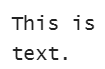 |
| K | Color prefix | `sheet.printInfo().headerLeft("&KFF0000This is text.");` |  |
| F | Spread name | `sheet.printInfo().headerLeft("spead name: &F");` | spread name: testSpread (If printed spread's name is "testSpread".) |
| A | Sheet name | `sheet.printInfo().headerLeft("sheet name: &A");` | sheet name: Sheet1 (If the printed sheet's name is "Sheet1".) |
The [orientation](/spreadjs/api/v17/classes/GC.Spread.Sheets.Print.PrintInfo#orientation) method is only supported when importing or exporting to Excel. The [paperSize](/spreadjs/api/v17/classes/GC.Spread.Sheets.Print.PrintInfo#paperSize) method only applies to the paging result, not the printer. Print preview is not supported. The printing result may be different between browsers.
> **Note:** Printing requires that you add the printing module to the page (gc.spread.sheets.print.*.*.\*.min.js).
The following code sample prints a sheet.
```JavaScript
...
// Initialize SpreadJS
var spread = new GC.Spread.Sheets.Workbook(document.getElementById("ss"),{sheetCount:3});
var activeSheet = spread.getActiveSheet();
activeSheet.suspendPaint();
// Set the value
for (var r = 0, rc = activeSheet.getRowCount() - 5; r < rc; r++) {
for (var c = 0, cc = activeSheet.getColumnCount() - 5; c < cc; c++) {
activeSheet.setValue(r, c, r + c);
}
}
activeSheet.resumePaint();
$("#button1").click(function () {
spread.print(0);
});
```