# Set Template Cell Type
## Content
Template cell types are a useful setting for efficiently organizing data within a ReportSheet. For example, if you want to create a row-based report, you can use the 'List' cell type, or if you want to create a sales summary report, you can use the 'Group' and 'Summary' cell types.
To configure the template cell type in a TemplateSheet, use the `setTemplateCell` method and specify the values for the `type` and `binding` properties.
All supported cell types are listed below.
* StaticCell
* ListCell
* GroupCell
* SummaryCell
The following code samples show how to set different template cell types for the cells in reports.
```javascript
// LIST REPORT.
const columns = ['orderId', 'orderDate', 'freight', 'customerId','shipName', 'shipCity', 'shipCountry'];
columns.forEach((columnName, i) => {
templateSheet.setValue(0, i, `${columnName[0].toUpperCase()}${columnName.substring(1)}`);
templateSheet.setTemplateCell(1, i, {
type: 'List',
binding: `Orders[${columnName}]`,
});
});
// GROUP and SUMMARY REPORTS.
templateSheet.addSpan(1, 0, 2, 1);
templateSheet.setTemplateCell(1, 0, {
type: 'Group',
binding: 'Orders[CustomerId]',
});
templateSheet.setTemplateCell(1, 1, {
type: 'Group',
formula: '=YEAR([@orderDate])',
binding: 'Orders[OrderDate]'
});
templateSheet.setTemplateCell(1, 2, {
type: 'Summary',
binding: 'Orders[Freight]',
});
// LIST, GROUP, and SUMMARY REPORTS
templateSheet.setTemplateCell(0, 0, {
type: 'Group',
binding: `Sales[Region]`,
});
templateSheet.setTemplateCell(0, 1, {
type: 'Summary',
binding: `Sales[Sales]`,
aggregate: 'Sum',
});
templateSheet.setTemplateCell(0, 2, {
type: 'List',
binding: `Sales[Salesman]`,
});
```
Note that SpreadJS Designer also provides this configuration through its TemplateSheet settings. This setting enables you to select the desired cell type from the **Type** section in the **Report Cell** properties panel.
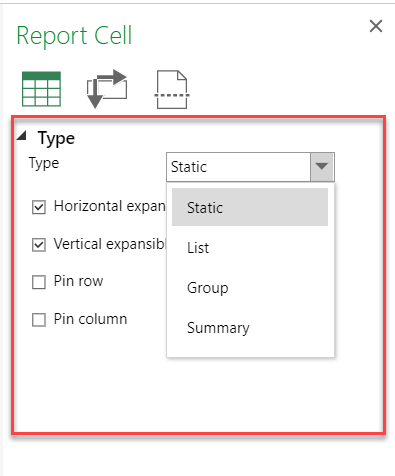
Based on the cell type selected, the setting options will be different.
A **GroupCell** is an extension of the base data cell that includes additional properties for advanced grouping. Advanced grouping allows users to group data based on condition rules or formula-calculated results. This feature enhances the data organization capabilities within the ReportSheet.
Using the `bins` and `formula` properties of the `IGroupBin` interface, you can define additional advanced grouping options in a GroupCell.
| **Property** | **Description** | **Sample Code** |
| -------- | ----------- | ----------- |
| @cols=3:**Advanced(bins)**
Users can add several custom group rules within the bins to match different records. |
| caption | Represents the name shown in the group result. | sheet.setTemplateCell(1, 0, {
binding: "Sales-NY[Sales]",
type: "Group",
bins: [
{caption: "Sales <= 200", groupBy: "=([@Sales] <= 200)"},
{caption: "Sales > 200 && Sales <= 500", groupBy: "=AND([@Sales] > 200, [@Sales] <= 500)"},
{caption: "Region", groupBy: "[@Region]"},
]
}); |
| groupBy [formula condition] | Groups data by the formula result. | sheet.setTemplateCell(1, 0, {
binding: "Sales-NY[Sales]",
type: "Group",
bins: [
{caption: "Sales <= 200", groupBy: "=([@Sales] <= 200)"},
{caption: "Sales > 200 && Sales <= 500", groupBy: "=AND([@Sales] > 200, [@Sales] <= 500)"},
{caption: "Sales > 500", groupBy: "=([@Sales] > 500)"},
]
}); |
| groupBy [field] | Groups data by the field value. | sheet.setTemplateCell(1, 0, {
binding: "Sales-NY[Sales]",
type: "Group",
bins: [
{caption: "Sales <= 200", groupBy: "=([@Sales] <= 200)"},
{caption: "Region", groupBy: "[@Region]"}
]
}); |
| groupBy [blank string] | Indicates a default group for records that do not match other conditions. | sheet.setTemplateCell(1, 0, {
binding: "Sales-NY[Sales]",
type: "Group",
bins: [
{caption: "Sales <= 200", groupBy: "=([@Sales] <= 200)"},
{caption: "Sales > 200 && Sales <= 500", groupBy: "=AND([@Sales] > 200, [@Sales] <= 500)"},
{caption: "Others", groupBy: ""} // match the remaining records.
]
}); |
| stopIfTrue | Determines whether the grouping should stop after a match is found. The default value is true. | sheet.setTemplateCell(1, 0, {
binding: "Sales-NY[Sales]",
type: "Group",
bins: [
{caption: "Sales <= 200", groupBy: "=([@Sales] <= 200)"},
{caption: "Sales > 200 && Sales <= 500", groupBy: "=AND([@Sales] > 200, [@Sales] <= 500)", stopIfTrue: false},
{caption: "Sales >= 500", groupBy: "=([@Sales] >= 500)"},
]
}); |
| alwaysVisible | Determines if a group that does not match any records, will not be shown in the result because it is a blank group with no records. | sheet.setTemplateCell(1, 0, {
binding: "Sales-NY[Sales]",
type: "Group",
bins: [
{caption: "Sales < 0", groupBy: "=([@Sales] < 0)", alwaysVisible: true},
{caption: "Sales <= 200", groupBy: "=([@Sales] <= 200)"},
{caption: "Sales > 200 && Sales <= 500", groupBy: "=AND([@Sales] > 200, [@Sales] <= 500)"},
{caption: "Sales > 500", groupBy: "=([@Sales] > 500)"},
]
}); |
| @cols=3:**Advanced(formula)**
Users can use a formula to calculate all records and then group by the formula calculated result. |
| formula | Groups data based on a calculated value from a table field. | sheet.setTemplateCell(1, 0, {
binding: "Orders[orderDate]",
type: "Group",
formula: "=YEAR([@orderDate])"
});
sheet.setTemplateCell(1, 1, {
binding: "Orders[orderDate]",
type: "Group",
formula: "=MONTH([@orderDate])"
}); |
> **Notes**:
>
> * The groupBy formula in bins rules supports static values and structure references, such as \`[@columnName]\`.
> Cell references are not supported.
> * In advanced group formulas, only the column field in the cell-binding table can be used.