# TableSheet Rules

## Content

TableSheet supports different data rules to help emphasize and visualize variations in the data as well as control the type of data entered in a TableSheet.

## Conditional Formatting and Data Validation

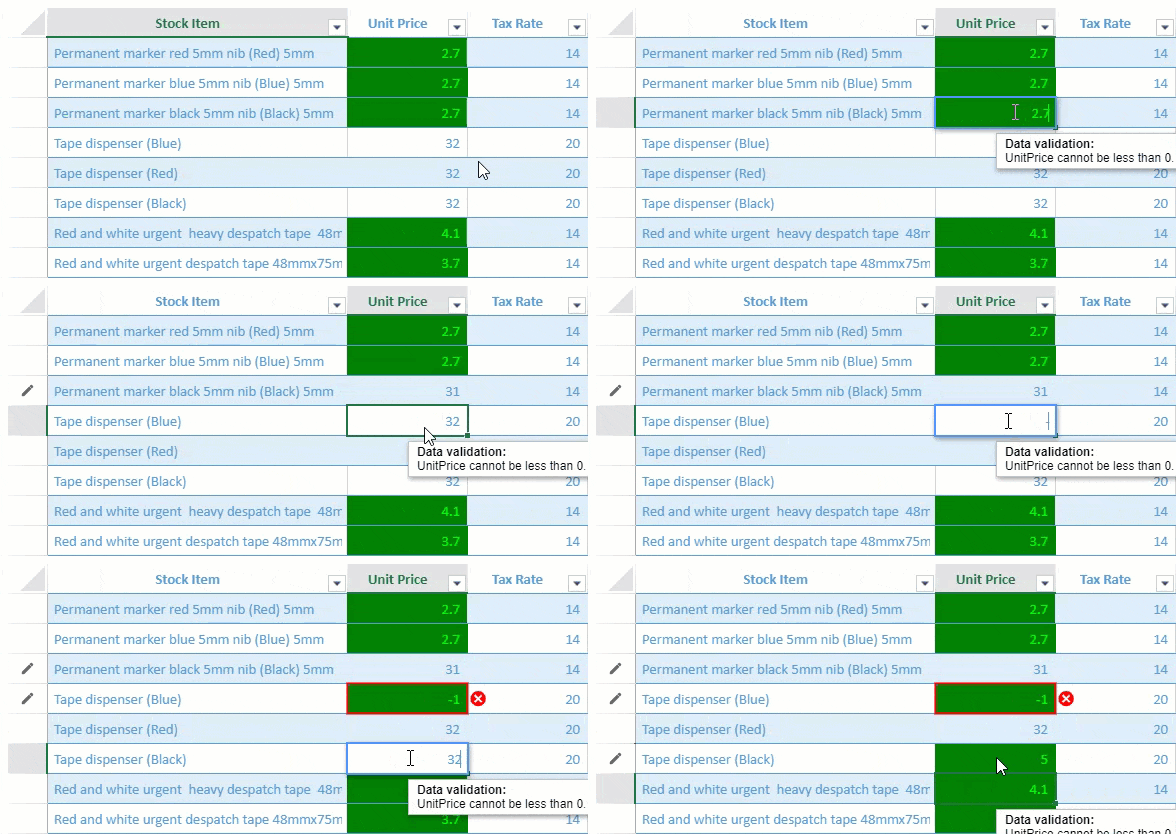
TableSheet supports data-bound conditional formatting and data validation in the TableSheet view.
![](https://gcdocumentsitekrblob.blob.core.windows.net/document-site-files/images/8d606653-16a0-474d-b9dc-e2b4d01c2446/images/ts-rules-condformat-dataval.gif)

You can specify the *conditionalFormat* and *validator* properties when defining the view column info. These properties accept different types of rule option arrays which are listed in the table below.
The following conditional format and data validation types are supported in the TableSheet.

| **Property** | **Types** |
| -------- | ----- |
| Conditional Format | `AverageRule`<br>`CellValueRule`<br>`DataBarRule`<br>`DateOccuringRule`<br>`DuplicateRule`<br>`FormulaRule`<br>`IconSetRule`<br>`SpecificTextRule`<br>`ThreeScaleRule`<br>`Top10Rule`<br>`TwoScaleRule`<br>`UniqueRule` |
| Data Validator | `DateValidator`<br>`FormulaListValidator`<br>`FormulaValidator`<br>`ListValidator`<br>`NumberValidator`<br>`TextLengthValidator`<br>`TimeValidator` |

The following code sample shows how to apply conditional formatting and data validation in a TableSheet.

```javascript
// formula to apply Conditional Formatting
var formulaRule = {
    ruleType: "formulaRule",
    formula: "@<10",
    style: {
        backColor: "green",
        foreColor: "lime"
    }
};
// create a data validator
var positiveNumberValidator = {
    type: "formula",
    formula: '@>0',
    inputTitle: 'Data validation:',
    inputMessage: 'UnitPrice cannot be less than 0.',
    highlightStyle: {
        type: 'icon',
        color: "red",
        position: 'outsideRight',
    }
};

//bind a view to the tablesheet
myTable.fetch().then(function () {
    var view = myTable.addView("myView", [

        { value: "stockItem", width: 300, caption: "Stock Item" },
        { value: "unitPrice", width: 120, caption: "Unit Price", conditionalFormats: [formulaRule], validator: positiveNumberValidator }, // apply conditional formating and data validation here
        { value: "taxRate", width: 120, caption: "Tax Rate" },
        { value: "=([@unitPrice] * [@taxRate])/100 + [@unitPrice]", caption: "Total Price", width: 150 }
    ]);
    sheet.setDataView(view);
});
```

## Style Rules

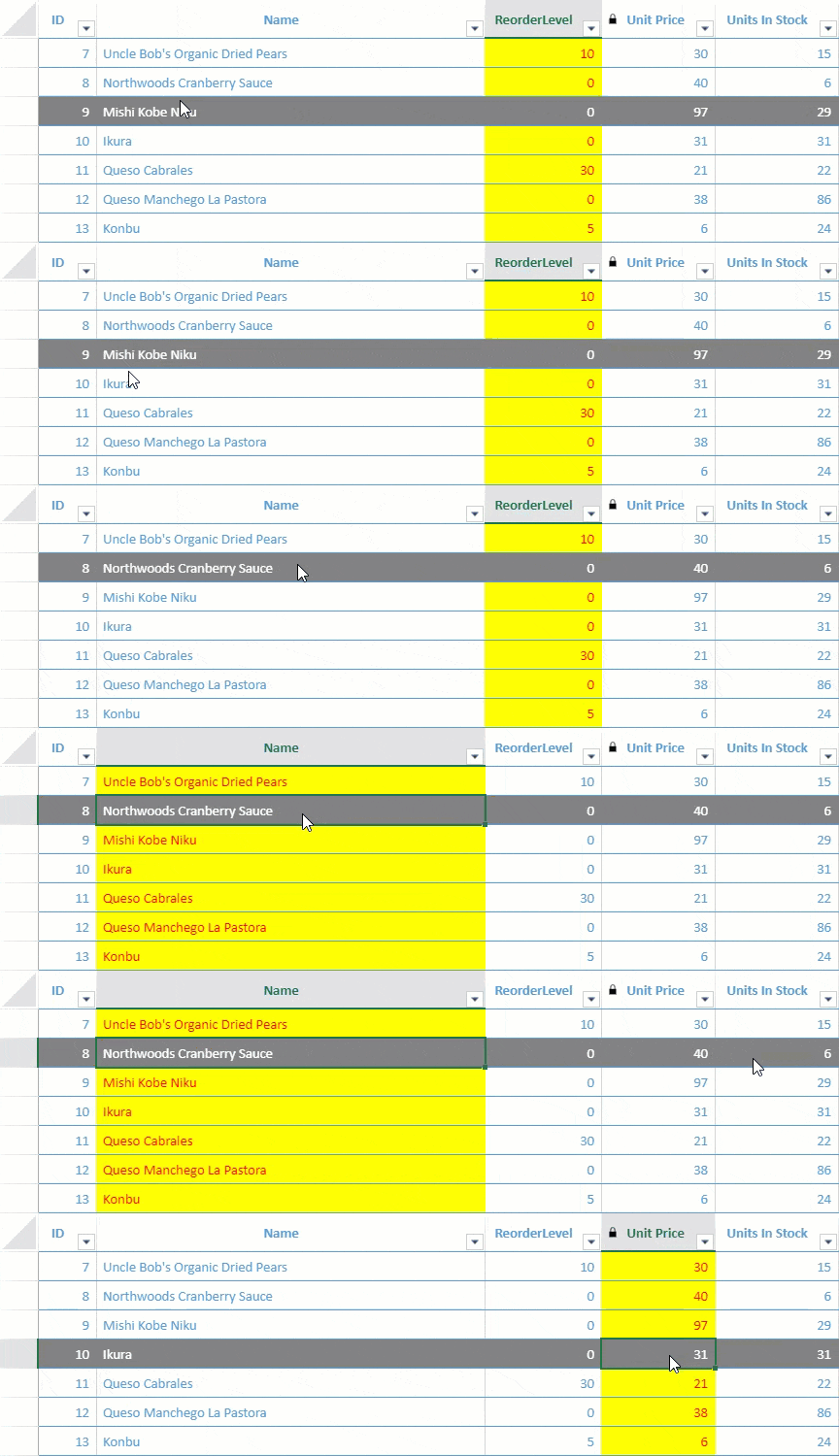
Style Rules are styles that are applied when a condition is met. You can add a state rule and formula rule using the **addStyleRule** method from GC.Data.View class or you can define *viewOptions* parameter of the **addView** method that also enables you to add a view to the Data Manager table using the **GC.Data.RowColumnStates** enumerations. You can also choose *viewport* or *colHeader* as view area to implement the style rule.

* **State Rule** – Apply style when a row or column state is triggered. For example, if you want to highlight a row with a gray back color whenever the mouse hovers over it, or highlight the selected column as illustrated in the image below:
<br>
    ![](https://gcdocumentsitekrblob.blob.core.windows.net/document-site-files/images/8d606653-16a0-474d-b9dc-e2b4d01c2446/images/ts-rules-staterule.gif)
* **Formula Rule** – Apply style to specific values that meet certain conditions. For example, if you want to highlight the lower price of a product, set formulas like "[@UnitPrice]<10" with a different fore color as shown in the image below:
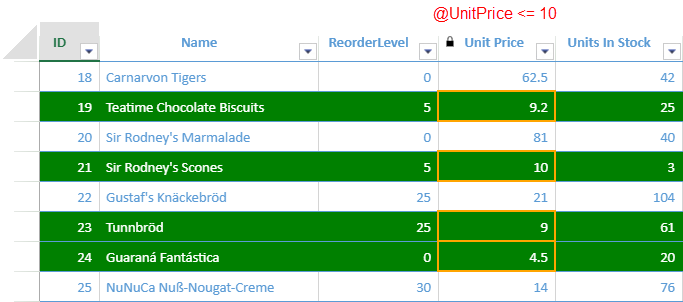
<br>
    ![](https://gcdocumentsitekrblob.blob.core.windows.net/document-site-files/images/8d606653-16a0-474d-b9dc-e2b4d01c2446/images/ts-rules-formularule.png)

The following code sample shows how to apply both the state rule and formula rule in a TableSheet.

```javascript
            // Setting formula rule
            var formulaRule = {
                ruleType: "formulaRule",
                formula: "@<=10",
                style: {
                    borderLeft: { color: "orange", style: "medium" },
                    borderRight: { color: "orange", style: "medium" },
                    borderTop: { color: "orange", style: "medium" },
                    borderBottom: { color: "orange", style: "medium" }
                }
            };
            //bind a view to the tablesheet 
            var myView = productTable.addView("myView", [
                { value: "Id", caption: "ID" },
                { value: "ProductName", caption: "Name", width: 400 },
                { value: "ReorderLevel", caption: "ReorderLevel", width: 120 },
                { value: "UnitPrice", caption: "Unit Price", width: 100, readonly: true, conditionalFormats: [formulaRule] },
                { value: "UnitsInStock", caption: "Units In Stock", width: 100 },
                { value: "UnitsOnOrder", caption: "Units On Order", width: 100 }
            ]);
            // Adding rules through addStyleRule method 
            myView.addStyleRule("lowPrice", { backColor: "green", foreColor: "white" }, {
                formula: "[@UnitPrice] <= 10"
            });
            myView.addStyleRule("HoverStyle", { backColor: "gray", foreColor: "white" }, {
                area: GC.Data.ViewArea.colHeader,
                direction: GC.Data.StateRuleDirection.row,
                state: GC.Data.RowColumnStates.hover
            });
            myView.addStyleRule("SelectedStyle", { backColor: "yellow", foreColor: "red" }, {
                area: GC.Data.ViewArea.colHeader,
                direction: GC.Data.StateRuleDirection.column,
                state: GC.Data.RowColumnStates.selected
            })
            myView.fetch().then(function () {
                sheet.setDataView(myView);
            });
```

**Types of States**
The following table lists all the available row and column state enumeration options in **GC.Data.RowColumnStates**.

| **<span class="NormalTextRun SCXW199311580 BCX0" style="margin: 0px; padding: 0px; user-select: text; -webkit-user-drag: none; -webkit-tap-highlight-color: transparent;">Enumeration Values</span>**<span class="EOP SCXW199311580 BCX0" data-ccp-props="{201341983:0,335559740:259}" style="margin: 0px; padding: 0px; user-select: text; -webkit-user-drag: none; -webkit-tap-highlight-color: transparent; font-size: 11pt; line-height: 19.425px; font-family: Calibri, Calibri_EmbeddedFont, Calibri_MSFontService, sans-serif; color: rgb(255, 0, 0);"> </span> | **<span class="NormalTextRun SCXW199311580 BCX0" style="margin: 0px; padding: 0px; user-select: text; -webkit-user-drag: none; -webkit-tap-highlight-color: transparent;">Description</span>**<span class="EOP SCXW199311580 BCX0" data-ccp-props="{201341983:0,335559740:259}" style="margin: 0px; padding: 0px; user-select: text; -webkit-user-drag: none; -webkit-tap-highlight-color: transparent; font-size: 11pt; line-height: 19.425px; font-family: Calibri, Calibri_EmbeddedFont, Calibri_MSFontService, sans-serif; color: rgb(255, 0, 0);"> </span> |
| ------------------- | ------------ |
| <span class="NormalTextRun SCXW199311580 BCX0" style="margin: 0px; padding: 0px; user-select: text; -webkit-user-drag: none; -webkit-tap-highlight-color: transparent;">active</span><span class="EOP SCXW199311580 BCX0" data-ccp-props="{201341983:0,335559740:259}" style="margin: 0px; padding: 0px; user-select: text; -webkit-user-drag: none; -webkit-tap-highlight-color: transparent; font-size: 11pt; line-height: 19.425px; font-family: Calibri, Calibri_EmbeddedFont, Calibri_MSFontService, sans-serif; color: rgb(255, 0, 0);"> </span> | <span class="NormalTextRun SCXW199311580 BCX0" style="margin: 0px; padding: 0px; user-select: text; -webkit-user-drag: none; -webkit-tap-highlight-color: transparent;">When the row or the column is in focus, its state includes the "active" state.</span><span class="EOP SCXW199311580 BCX0" data-ccp-props="{201341983:0,335559740:259}" style="margin: 0px; padding: 0px; user-select: text; -webkit-user-drag: none; -webkit-tap-highlight-color: transparent; font-size: 11pt; line-height: 19.425px; font-family: Calibri, Calibri_EmbeddedFont, Calibri_MSFontService, sans-serif; color: rgb(255, 0, 0);"> </span> |
| <span class="NormalTextRun SCXW199311580 BCX0" style="margin: 0px; padding: 0px; user-select: text; -webkit-user-drag: none; -webkit-tap-highlight-color: transparent;">dirty</span><span class="EOP SCXW199311580 BCX0" data-ccp-props="{201341983:0,335559740:259}" style="margin: 0px; padding: 0px; user-select: text; -webkit-user-drag: none; -webkit-tap-highlight-color: transparent; font-size: 11pt; line-height: 19.425px; font-family: Calibri, Calibri_EmbeddedFont, Calibri_MSFontService, sans-serif; color: rgb(255, 0, 0);"> </span> | <span class="NormalTextRun SCXW199311580 BCX0" style="margin: 0px; padding: 0px; user-select: text; -webkit-user-drag: none; -webkit-tap-highlight-color: transparent;">When cell value is changed, cell row and column state include "dirty" state.</span><span class="EOP SCXW199311580 BCX0" data-ccp-props="{201341983:0,335559740:259}" style="margin: 0px; padding: 0px; user-select: text; -webkit-user-drag: none; -webkit-tap-highlight-color: transparent; font-size: 11pt; line-height: 19.425px; font-family: Calibri, Calibri_EmbeddedFont, Calibri_MSFontService, sans-serif; color: rgb(255, 0, 0);"> </span> |
| <span class="NormalTextRun SCXW199311580 BCX0" style="margin: 0px; padding: 0px; user-select: text; -webkit-user-drag: none; -webkit-tap-highlight-color: transparent;">hover</span><span class="EOP SCXW199311580 BCX0" data-ccp-props="{201341983:0,335559740:259}" style="margin: 0px; padding: 0px; user-select: text; -webkit-user-drag: none; -webkit-tap-highlight-color: transparent; font-size: 11pt; line-height: 19.425px; font-family: Calibri, Calibri_EmbeddedFont, Calibri_MSFontService, sans-serif; color: rgb(255, 0, 0);"> </span> | <span class="NormalTextRun SCXW199311580 BCX0" style="margin: 0px; padding: 0px; user-select: text; -webkit-user-drag: none; -webkit-tap-highlight-color: transparent;">When mouse hovers on the row and the column, its state includes "hover" state.</span><span class="EOP SCXW199311580 BCX0" data-ccp-props="{201341983:0,335559740:259}" style="margin: 0px; padding: 0px; user-select: text; -webkit-user-drag: none; -webkit-tap-highlight-color: transparent; font-size: 11pt; line-height: 19.425px; font-family: Calibri, Calibri_EmbeddedFont, Calibri_MSFontService, sans-serif; color: rgb(255, 0, 0);"> </span> |
| <span class="NormalTextRun SCXW199311580 BCX0" style="margin: 0px; padding: 0px; user-select: text; -webkit-user-drag: none; -webkit-tap-highlight-color: transparent;">inserted</span><span class="EOP SCXW199311580 BCX0" data-ccp-props="{201341983:0,335559740:259}" style="margin: 0px; padding: 0px; user-select: text; -webkit-user-drag: none; -webkit-tap-highlight-color: transparent; font-size: 11pt; line-height: 19.425px; font-family: Calibri, Calibri_EmbeddedFont, Calibri_MSFontService, sans-serif; color: rgb(255, 0, 0);"> </span> | <span class="NormalTextRun SCXW199311580 BCX0" style="margin: 0px; padding: 0px; user-select: text; -webkit-user-drag: none; -webkit-tap-highlight-color: transparent;">When inserted a row, its state includes "inserted" state. This state is only supported for row.</span><span class="EOP SCXW199311580 BCX0" data-ccp-props="{201341983:0,335559740:259}" style="margin: 0px; padding: 0px; user-select: text; -webkit-user-drag: none; -webkit-tap-highlight-color: transparent; font-size: 11pt; line-height: 19.425px; font-family: Calibri, Calibri_EmbeddedFont, Calibri_MSFontService, sans-serif; color: rgb(255, 0, 0);"> </span> |
| <span class="NormalTextRun SCXW199311580 BCX0" style="margin: 0px; padding: 0px; user-select: text; -webkit-user-drag: none; -webkit-tap-highlight-color: transparent;">pin</span><span class="EOP SCXW199311580 BCX0" data-ccp-props="{201341983:0,335559740:259}" style="margin: 0px; padding: 0px; user-select: text; -webkit-user-drag: none; -webkit-tap-highlight-color: transparent; font-size: 11pt; line-height: 19.425px; font-family: Calibri, Calibri_EmbeddedFont, Calibri_MSFontService, sans-serif; color: rgb(255, 0, 0);"> </span> | <span class="NormalTextRun SCXW199311580 BCX0" style="margin: 0px; padding: 0px; user-select: text; -webkit-user-drag: none; -webkit-tap-highlight-color: transparent;">When pin a row/column, its state includes "pin" state.</span><span class="EOP SCXW199311580 BCX0" data-ccp-props="{201341983:0,335559740:259}" style="margin: 0px; padding: 0px; user-select: text; -webkit-user-drag: none; -webkit-tap-highlight-color: transparent; font-size: 11pt; line-height: 19.425px; font-family: Calibri, Calibri_EmbeddedFont, Calibri_MSFontService, sans-serif; color: rgb(255, 0, 0);"> </span> |
| <span class="NormalTextRun SpellingErrorV2Themed SCXW199311580 BCX0" style="margin: 0px; padding: 0px; user-select: text; -webkit-user-drag: none; -webkit-tap-highlight-color: transparent; background-repeat: repeat-x; background-position: left bottom; background-image: var(--urlSpellingErrorV2, url(data:image/svg+xml;base64,PD94bWwgdmVyc2lvbj0iMS4wIiBlbmNvZGluZz0iVVRGLTgiPz4KPHN2ZyB3aWR0aD0iNXB4IiBoZWlnaHQ9IjRweCIgdmlld0JveD0iMCAwIDUgNCIgdmVyc2lvbj0iMS4xIiB4bWxucz0iaHR0cDovL3d3dy53My5vcmcvMjAwMC9zdmciIHhtbG5zOnhsaW5rPSJodHRwOi8vd3d3LnczLm9yZy8xOTk5L3hsaW5rIj4KICAgIDwhLS0gR2VuZXJhdG9yOiBTa2V0Y2ggNTYuMiAoODE2NzIpIC0gaHR0cHM6Ly9za2V0Y2guY29tIC0tPgogICAgPHRpdGxlPnNwZWxsaW5nX3NxdWlnZ2xlPC90aXRsZT4KICAgIDxkZXNjPkNyZWF0ZWQgd2l0aCBTa2V0Y2guPC9kZXNjPgogICAgPGcgaWQ9IkZsYWdzIiBzdHJva2U9Im5vbmUiIHN0cm9rZS13aWR0aD0iMSIgZmlsbD0ibm9uZSIgZmlsbC1ydWxlPSJldmVub2RkIj4KICAgICAgICA8ZyB0cmFuc2Zvcm09InRyYW5zbGF0ZSgtMTAxMC4wMDAwMDAsIC0yOTYuMDAwMDAwKSIgaWQ9InNwZWxsaW5nX3NxdWlnZ2xlIj4KICAgICAgICAgICAgPGcgdHJhbnNmb3JtPSJ0cmFuc2xhdGUoMTAxMC4wMDAwMDAsIDI5Ni4wMDAwMDApIj4KICAgICAgICAgICAgICAgIDxwYXRoIGQ9Ik0wLDMgQzEuMjUsMyAxLjI1LDEgMi41LDEgQzMuNzUsMSAzLjc1LDMgNSwzIiBpZD0iUGF0aCIgc3Ryb2tlPSIjRUIwMDAwIiBzdHJva2Utd2lkdGg9IjEiPjwvcGF0aD4KICAgICAgICAgICAgICAgIDxyZWN0IGlkPSJSZWN0YW5nbGUiIHg9IjAiIHk9IjAiIHdpZHRoPSI1IiBoZWlnaHQ9IjQiPjwvcmVjdD4KICAgICAgICAgICAgPC9nPgogICAgICAgIDwvZz4KICAgIDwvZz4KPC9zdmc+)); border-bottom: 1px solid transparent;">primaryKey</span><span class="EOP SCXW199311580 BCX0" data-ccp-props="{201341983:0,335559740:259}" style="margin: 0px; padding: 0px; user-select: text; -webkit-user-drag: none; -webkit-tap-highlight-color: transparent; font-size: 11pt; line-height: 19.425px; font-family: Calibri, Calibri_EmbeddedFont, Calibri_MSFontService, sans-serif; color: rgb(255, 0, 0);"> </span> | <span class="NormalTextRun SCXW199311580 BCX0" style="margin: 0px; padding: 0px; user-select: text; -webkit-user-drag: none; -webkit-tap-highlight-color: transparent;">When the column has primary key, its state includes "</span><span class="NormalTextRun SpellingErrorV2Themed SCXW199311580 BCX0" style="margin: 0px; padding: 0px; user-select: text; -webkit-user-drag: none; -webkit-tap-highlight-color: transparent; background-repeat: repeat-x; background-position: left bottom; background-image: var(--urlSpellingErrorV2, url(data:image/svg+xml;base64,PD94bWwgdmVyc2lvbj0iMS4wIiBlbmNvZGluZz0iVVRGLTgiPz4KPHN2ZyB3aWR0aD0iNXB4IiBoZWlnaHQ9IjRweCIgdmlld0JveD0iMCAwIDUgNCIgdmVyc2lvbj0iMS4xIiB4bWxucz0iaHR0cDovL3d3dy53My5vcmcvMjAwMC9zdmciIHhtbG5zOnhsaW5rPSJodHRwOi8vd3d3LnczLm9yZy8xOTk5L3hsaW5rIj4KICAgIDwhLS0gR2VuZXJhdG9yOiBTa2V0Y2ggNTYuMiAoODE2NzIpIC0gaHR0cHM6Ly9za2V0Y2guY29tIC0tPgogICAgPHRpdGxlPnNwZWxsaW5nX3NxdWlnZ2xlPC90aXRsZT4KICAgIDxkZXNjPkNyZWF0ZWQgd2l0aCBTa2V0Y2guPC9kZXNjPgogICAgPGcgaWQ9IkZsYWdzIiBzdHJva2U9Im5vbmUiIHN0cm9rZS13aWR0aD0iMSIgZmlsbD0ibm9uZSIgZmlsbC1ydWxlPSJldmVub2RkIj4KICAgICAgICA8ZyB0cmFuc2Zvcm09InRyYW5zbGF0ZSgtMTAxMC4wMDAwMDAsIC0yOTYuMDAwMDAwKSIgaWQ9InNwZWxsaW5nX3NxdWlnZ2xlIj4KICAgICAgICAgICAgPGcgdHJhbnNmb3JtPSJ0cmFuc2xhdGUoMTAxMC4wMDAwMDAsIDI5Ni4wMDAwMDApIj4KICAgICAgICAgICAgICAgIDxwYXRoIGQ9Ik0wLDMgQzEuMjUsMyAxLjI1LDEgMi41LDEgQzMuNzUsMSAzLjc1LDMgNSwzIiBpZD0iUGF0aCIgc3Ryb2tlPSIjRUIwMDAwIiBzdHJva2Utd2lkdGg9IjEiPjwvcGF0aD4KICAgICAgICAgICAgICAgIDxyZWN0IGlkPSJSZWN0YW5nbGUiIHg9IjAiIHk9IjAiIHdpZHRoPSI1IiBoZWlnaHQ9IjQiPjwvcmVjdD4KICAgICAgICAgICAgPC9nPgogICAgICAgIDwvZz4KICAgIDwvZz4KPC9zdmc+)); border-bottom: 1px solid transparent;">primaryKey</span><span class="NormalTextRun SCXW199311580 BCX0" style="margin: 0px; padding: 0px; user-select: text; -webkit-user-drag: none; -webkit-tap-highlight-color: transparent;">" state. This state is only supported for column.</span><span class="EOP SCXW199311580 BCX0" data-ccp-props="{201341983:0,335559740:259}" style="margin: 0px; padding: 0px; user-select: text; -webkit-user-drag: none; -webkit-tap-highlight-color: transparent; font-size: 11pt; line-height: 19.425px; font-family: Calibri, Calibri_EmbeddedFont, Calibri_MSFontService, sans-serif; color: rgb(255, 0, 0);"> </span> |
| <span class="NormalTextRun SpellingErrorV2Themed SCXW199311580 BCX0" style="margin: 0px; padding: 0px; user-select: text; -webkit-user-drag: none; -webkit-tap-highlight-color: transparent; background-repeat: repeat-x; background-position: left bottom; background-image: var(--urlSpellingErrorV2, url(data:image/svg+xml;base64,PD94bWwgdmVyc2lvbj0iMS4wIiBlbmNvZGluZz0iVVRGLTgiPz4KPHN2ZyB3aWR0aD0iNXB4IiBoZWlnaHQ9IjRweCIgdmlld0JveD0iMCAwIDUgNCIgdmVyc2lvbj0iMS4xIiB4bWxucz0iaHR0cDovL3d3dy53My5vcmcvMjAwMC9zdmciIHhtbG5zOnhsaW5rPSJodHRwOi8vd3d3LnczLm9yZy8xOTk5L3hsaW5rIj4KICAgIDwhLS0gR2VuZXJhdG9yOiBTa2V0Y2ggNTYuMiAoODE2NzIpIC0gaHR0cHM6Ly9za2V0Y2guY29tIC0tPgogICAgPHRpdGxlPnNwZWxsaW5nX3NxdWlnZ2xlPC90aXRsZT4KICAgIDxkZXNjPkNyZWF0ZWQgd2l0aCBTa2V0Y2guPC9kZXNjPgogICAgPGcgaWQ9IkZsYWdzIiBzdHJva2U9Im5vbmUiIHN0cm9rZS13aWR0aD0iMSIgZmlsbD0ibm9uZSIgZmlsbC1ydWxlPSJldmVub2RkIj4KICAgICAgICA8ZyB0cmFuc2Zvcm09InRyYW5zbGF0ZSgtMTAxMC4wMDAwMDAsIC0yOTYuMDAwMDAwKSIgaWQ9InNwZWxsaW5nX3NxdWlnZ2xlIj4KICAgICAgICAgICAgPGcgdHJhbnNmb3JtPSJ0cmFuc2xhdGUoMTAxMC4wMDAwMDAsIDI5Ni4wMDAwMDApIj4KICAgICAgICAgICAgICAgIDxwYXRoIGQ9Ik0wLDMgQzEuMjUsMyAxLjI1LDEgMi41LDEgQzMuNzUsMSAzLjc1LDMgNSwzIiBpZD0iUGF0aCIgc3Ryb2tlPSIjRUIwMDAwIiBzdHJva2Utd2lkdGg9IjEiPjwvcGF0aD4KICAgICAgICAgICAgICAgIDxyZWN0IGlkPSJSZWN0YW5nbGUiIHg9IjAiIHk9IjAiIHdpZHRoPSI1IiBoZWlnaHQ9IjQiPjwvcmVjdD4KICAgICAgICAgICAgPC9nPgogICAgICAgIDwvZz4KICAgIDwvZz4KPC9zdmc+)); border-bottom: 1px solid transparent;">readonly</span><span class="EOP SCXW199311580 BCX0" data-ccp-props="{201341983:0,335559740:259}" style="margin: 0px; padding: 0px; user-select: text; -webkit-user-drag: none; -webkit-tap-highlight-color: transparent; font-size: 11pt; line-height: 19.425px; font-family: Calibri, Calibri_EmbeddedFont, Calibri_MSFontService, sans-serif; color: rgb(255, 0, 0);"> </span> | <span class="NormalTextRun SCXW199311580 BCX0" style="margin: 0px; padding: 0px; user-select: text; -webkit-user-drag: none; -webkit-tap-highlight-color: transparent;">When the column is locked, its state includes "</span><span class="NormalTextRun SpellingErrorV2Themed SCXW199311580 BCX0" style="margin: 0px; padding: 0px; user-select: text; -webkit-user-drag: none; -webkit-tap-highlight-color: transparent; background-repeat: repeat-x; background-position: left bottom; background-image: var(--urlSpellingErrorV2, url(data:image/svg+xml;base64,PD94bWwgdmVyc2lvbj0iMS4wIiBlbmNvZGluZz0iVVRGLTgiPz4KPHN2ZyB3aWR0aD0iNXB4IiBoZWlnaHQ9IjRweCIgdmlld0JveD0iMCAwIDUgNCIgdmVyc2lvbj0iMS4xIiB4bWxucz0iaHR0cDovL3d3dy53My5vcmcvMjAwMC9zdmciIHhtbG5zOnhsaW5rPSJodHRwOi8vd3d3LnczLm9yZy8xOTk5L3hsaW5rIj4KICAgIDwhLS0gR2VuZXJhdG9yOiBTa2V0Y2ggNTYuMiAoODE2NzIpIC0gaHR0cHM6Ly9za2V0Y2guY29tIC0tPgogICAgPHRpdGxlPnNwZWxsaW5nX3NxdWlnZ2xlPC90aXRsZT4KICAgIDxkZXNjPkNyZWF0ZWQgd2l0aCBTa2V0Y2guPC9kZXNjPgogICAgPGcgaWQ9IkZsYWdzIiBzdHJva2U9Im5vbmUiIHN0cm9rZS13aWR0aD0iMSIgZmlsbD0ibm9uZSIgZmlsbC1ydWxlPSJldmVub2RkIj4KICAgICAgICA8ZyB0cmFuc2Zvcm09InRyYW5zbGF0ZSgtMTAxMC4wMDAwMDAsIC0yOTYuMDAwMDAwKSIgaWQ9InNwZWxsaW5nX3NxdWlnZ2xlIj4KICAgICAgICAgICAgPGcgdHJhbnNmb3JtPSJ0cmFuc2xhdGUoMTAxMC4wMDAwMDAsIDI5Ni4wMDAwMDApIj4KICAgICAgICAgICAgICAgIDxwYXRoIGQ9Ik0wLDMgQzEuMjUsMyAxLjI1LDEgMi41LDEgQzMuNzUsMSAzLjc1LDMgNSwzIiBpZD0iUGF0aCIgc3Ryb2tlPSIjRUIwMDAwIiBzdHJva2Utd2lkdGg9IjEiPjwvcGF0aD4KICAgICAgICAgICAgICAgIDxyZWN0IGlkPSJSZWN0YW5nbGUiIHg9IjAiIHk9IjAiIHdpZHRoPSI1IiBoZWlnaHQ9IjQiPjwvcmVjdD4KICAgICAgICAgICAgPC9nPgogICAgICAgIDwvZz4KICAgIDwvZz4KPC9zdmc+)); border-bottom: 1px solid transparent;">readonly</span><span class="NormalTextRun SCXW199311580 BCX0" style="margin: 0px; padding: 0px; user-select: text; -webkit-user-drag: none; -webkit-tap-highlight-color: transparent;">" state. This state only support for column.</span><span class="EOP SCXW199311580 BCX0" data-ccp-props="{201341983:0,335559740:259}" style="margin: 0px; padding: 0px; user-select: text; -webkit-user-drag: none; -webkit-tap-highlight-color: transparent; font-size: 11pt; line-height: 19.425px; font-family: Calibri, Calibri_EmbeddedFont, Calibri_MSFontService, sans-serif; color: rgb(255, 0, 0);"> </span> |
| <span class="NormalTextRun SCXW199311580 BCX0" style="margin: 0px; padding: 0px; user-select: text; -webkit-user-drag: none; -webkit-tap-highlight-color: transparent;">required</span><span class="EOP SCXW199311580 BCX0" data-ccp-props="{201341983:0,335559740:259}" style="margin: 0px; padding: 0px; user-select: text; -webkit-user-drag: none; -webkit-tap-highlight-color: transparent; font-size: 11pt; line-height: 19.425px; font-family: Calibri, Calibri_EmbeddedFont, Calibri_MSFontService, sans-serif; color: rgb(255, 0, 0);"> </span> | <span class="NormalTextRun SCXW199311580 BCX0" style="margin: 0px; padding: 0px; user-select: text; -webkit-user-drag: none; -webkit-tap-highlight-color: transparent;">When the value of the column is required, its state includes "required" state. This state is only supported for column.</span><span class="EOP SCXW199311580 BCX0" data-ccp-props="{201341983:0,335559740:259}" style="margin: 0px; padding: 0px; user-select: text; -webkit-user-drag: none; -webkit-tap-highlight-color: transparent; font-size: 11pt; line-height: 19.425px; font-family: Calibri, Calibri_EmbeddedFont, Calibri_MSFontService, sans-serif; color: rgb(255, 0, 0);"> </span> |
| <span class="NormalTextRun SCXW199311580 BCX0" style="margin: 0px; padding: 0px; user-select: text; -webkit-user-drag: none; -webkit-tap-highlight-color: transparent;">selected</span><span class="EOP SCXW199311580 BCX0" data-ccp-props="{201341983:0,335559740:259}" style="margin: 0px; padding: 0px; user-select: text; -webkit-user-drag: none; -webkit-tap-highlight-color: transparent; font-size: 11pt; line-height: 19.425px; font-family: Calibri, Calibri_EmbeddedFont, Calibri_MSFontService, sans-serif; color: rgb(255, 0, 0);"> </span> | <span class="NormalTextRun SCXW199311580 BCX0" style="margin: 0px; padding: 0px; user-select: text; -webkit-user-drag: none; -webkit-tap-highlight-color: transparent;">When the cell is in the selection range, the cell row and column state include the "selected" state.</span><span class="EOP SCXW199311580 BCX0" data-ccp-props="{201341983:0,335559740:259}" style="margin: 0px; padding: 0px; user-select: text; -webkit-user-drag: none; -webkit-tap-highlight-color: transparent; font-size: 11pt; line-height: 19.425px; font-family: Calibri, Calibri_EmbeddedFont, Calibri_MSFontService, sans-serif; color: rgb(255, 0, 0);"> </span> |
| <span class="NormalTextRun SCXW199311580 BCX0" style="margin: 0px; padding: 0px; user-select: text; -webkit-user-drag: none; -webkit-tap-highlight-color: transparent;">updated</span><span class="EOP SCXW199311580 BCX0" data-ccp-props="{201341983:0,335559740:259}" style="margin: 0px; padding: 0px; user-select: text; -webkit-user-drag: none; -webkit-tap-highlight-color: transparent; font-size: 11pt; line-height: 19.425px; font-family: Calibri, Calibri_EmbeddedFont, Calibri_MSFontService, sans-serif; color: rgb(255, 0, 0);"> </span> | <span class="NormalTextRun SCXW199311580 BCX0" style="margin: 0px; padding: 0px; user-select: text; -webkit-user-drag: none; -webkit-tap-highlight-color: transparent;">When updated a row, its state includes "updated" state. This state is only supported for row.</span><span class="EOP SCXW199311580 BCX0" data-ccp-props="{201341983:0,335559740:259}" style="margin: 0px; padding: 0px; user-select: text; -webkit-user-drag: none; -webkit-tap-highlight-color: transparent; font-size: 11pt; line-height: 19.425px; font-family: Calibri, Calibri_EmbeddedFont, Calibri_MSFontService, sans-serif; color: rgb(255, 0, 0);"> </span> |

Using SpreadJS, you can also update or remove the default rules.
The following code sample shows how to **update** the **readonly** state icon.

```javascript
            // update the icon of the readonly state
            view.addStyleRule("readonly", {
                decoration: {
                    icons: [
                        {
                            src: 'readonly.png'
                        }
                    ]
                }
            }, {
                area: GC.Data.ViewArea.colHeader,
                direction: GC.Data.StateRuleDirection.column,
                state: GC.Data.RowColumnStates.readonly
            });
```

<span style="margin: 0px; padding: 0px; user-select: text; -webkit-user-drag: none; -webkit-tap-highlight-color: transparent;" class="NormalTextRun SCXW126384371 BCX0">The following code sample shows how to remove the style rule </span>**<span style="margin: 0px; padding: 0px; user-select: text; -webkit-user-drag: none; -webkit-tap-highlight-color: transparent;" class="NormalTextRun SCXW126384371 BCX0">readonly</span>**<span style="margin: 0px; padding: 0px; user-select: text; -webkit-user-drag: none; -webkit-tap-highlight-color: transparent;" class="NormalTextRun SCXW126384371 BCX0"> icon.</span><span style="margin: 0px; padding: 0px; user-select: text; -webkit-user-drag: none; -webkit-tap-highlight-color: transparent; color: rgb(0, 0, 0); font-style: normal; font-variant-ligatures: normal; font-variant-caps: normal; font-weight: 400; letter-spacing: normal; orphans: 2; text-align: left; text-indent: 0px; text-transform: none; white-space: pre-wrap; widows: 2; word-spacing: 0px; -webkit-text-stroke-width: 0px; background-color: rgb(255, 255, 255); text-decoration-thickness: initial; text-decoration-style: initial; text-decoration-color: initial; font-size: 11pt; line-height: 19.425px; font-family: Calibri, Calibri_EmbeddedFont, Calibri_MSFontService, sans-serif;" data-ccp-props="{201341983:0,335559739:160,335559740:259}" class="EOP SCXW126384371 BCX0"> </span>

```javascript
 // Remove the readonly state icon 
 view.removeStyleRule("readonly"); 
```

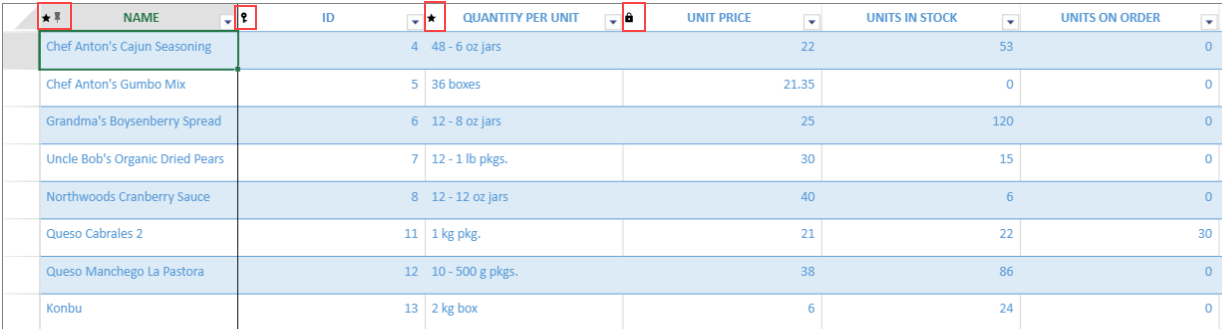
The following image shows how "Is Primary Key", "Read Only" and "IsRequired" icons appear on the column header of the TableSheet.
![tablesheetrule-code](https://gcdocumentsitekrblob.blob.core.windows.net/document-site-files/images/df1fe1ee-eb3c-4da7-8c20-a0d8d2b7e734/tablesheetrule-code.4fb264.png?width=500)
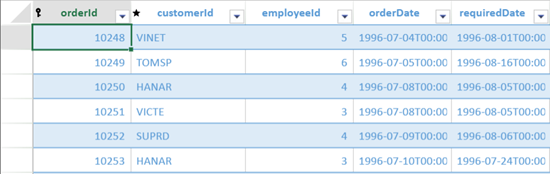
The following image shows how the tablesheet looks after implementing the **removeStyleRule** method on **readonly** icon. 
![after-removerule](https://gcdocumentsitekrblob.blob.core.windows.net/document-site-files/images/df1fe1ee-eb3c-4da7-8c20-a0d8d2b7e734/after-removerule.6e47cc.png)

### <span style="margin: 0px; padding: 0px; user-select: text; -webkit-user-drag: none; -webkit-tap-highlight-color: transparent;" class="NormalTextRun SCXW38762665 BCX0">Using Designer</span><span style="margin: 0px; padding: 0px; user-select: text; -webkit-user-drag: none; -webkit-tap-highlight-color: transparent; color: rgb(0, 0, 0); font-style: normal; font-variant-ligatures: normal; font-variant-caps: normal; font-weight: 400; letter-spacing: normal; orphans: 2; text-align: left; text-indent: 0px; text-transform: none; white-space: pre-wrap; widows: 2; word-spacing: 0px; -webkit-text-stroke-width: 0px; background-color: rgb(255, 255, 255); text-decoration-thickness: initial; text-decoration-style: initial; text-decoration-color: initial; font-size: 11pt; line-height: 19.425px; font-family: Calibri, Calibri_EmbeddedFont, Calibri_MSFontService, sans-serif;" data-ccp-props="{201341983:0,335559739:160,335559740:259}" class="EOP SCXW38762665 BCX0"> </span>

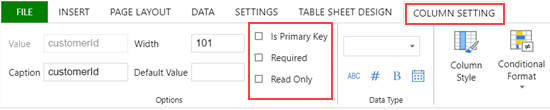
<span style="margin: 0px; padding: 0px; user-select: text; -webkit-user-drag: none; -webkit-tap-highlight-color: transparent;" class="NormalTextRun SCXW253366490 BCX0">You can assign the pre-defined rules to the column headers using the </span>**<span style="margin: 0px; padding: 0px; user-select: text; -webkit-user-drag: none; -webkit-tap-highlight-color: transparent;" class="NormalTextRun SCXW253366490 BCX0">Column Setting</span>**<span style="margin: 0px; padding: 0px; user-select: text; -webkit-user-drag: none; -webkit-tap-highlight-color: transparent;" class="NormalTextRun SCXW253366490 BCX0"> tab of the SpreadJS Designer.</span><span style="margin: 0px; padding: 0px; user-select: text; -webkit-user-drag: none; -webkit-tap-highlight-color: transparent; color: rgb(0, 0, 0); font-style: normal; font-variant-ligatures: normal; font-variant-caps: normal; font-weight: 400; letter-spacing: normal; orphans: 2; text-align: left; text-indent: 0px; text-transform: none; white-space: pre-wrap; widows: 2; word-spacing: 0px; -webkit-text-stroke-width: 0px; background-color: rgb(255, 255, 255); text-decoration-thickness: initial; text-decoration-style: initial; text-decoration-color: initial; font-size: 11pt; line-height: 19.425px; font-family: Calibri, Calibri_EmbeddedFont, Calibri_MSFontService, sans-serif;" data-ccp-props="{201341983:0,335559739:160,335559740:259}" class="EOP SCXW253366490 BCX0"> </span>
![set-rule](https://gcdocumentsitekrblob.blob.core.windows.net/document-site-files/images/df1fe1ee-eb3c-4da7-8c20-a0d8d2b7e734/set-rule.c9593c.png?width=500)
The following image shows how rules appear on the column header of the TableSheet.
![tablesheet-rule (1)](https://gcdocumentsitekrblob.blob.core.windows.net/document-site-files/images/df1fe1ee-eb3c-4da7-8c20-a0d8d2b7e734/tablesheet-rule%20(1).fa9a54.png?width=500)
After applying rules, you can style the rules in a TableSheet using the **Table Sheet Design** Tab of the SpreadJS Designer.

![style-rules](https://gcdocumentsitekrblob.blob.core.windows.net/document-site-files/images/df1fe1ee-eb3c-4da7-8c20-a0d8d2b7e734/style-rules.393552.png?width=500)
**<span style="margin: 0px; padding: 0px; user-select: text; -webkit-user-drag: none; -webkit-tap-highlight-color: transparent;" class="NormalTextRun SCXW144099777 BCX0">Steps to style the rules are as follows:</span>**   <span style="margin: 0px; padding: 0px; user-select: text; -webkit-user-drag: none; -webkit-tap-highlight-color: transparent; color: rgb(0, 0, 0); font-style: normal; font-variant-ligatures: normal; font-variant-caps: normal; font-weight: 400; letter-spacing: normal; orphans: 2; text-align: left; text-indent: 0px; text-transform: none; white-space: pre-wrap; widows: 2; word-spacing: 0px; -webkit-text-stroke-width: 0px; background-color: rgb(255, 255, 255); text-decoration-thickness: initial; text-decoration-style: initial; text-decoration-color: initial; font-size: 11pt; line-height: 19.425px; font-family: Calibri, Calibri_EmbeddedFont, Calibri_MSFontService, sans-serif;" data-ccp-props="{201341983:0,335559739:160,335559740:259}" class="EOP SCXW144099777 BCX0"> </span>

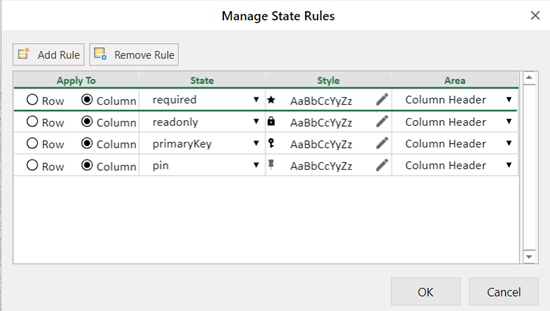
1. Click on the State Rules option from the Table Sheet Design tab to open the Manage State Rules dialog box. 
    ![manage-state-rules](https://gcdocumentsitekrblob.blob.core.windows.net/document-site-files/images/df1fe1ee-eb3c-4da7-8c20-a0d8d2b7e734/manage-state-rules.d24621.png?width=500)
2. <span style="margin: 0px; padding: 0px; user-select: text; -webkit-user-drag: none; -webkit-tap-highlight-color: transparent;" class="NormalTextRun SCXW119686062 BCX0">Choose a suitable option to apply rules on the column header. </span><span style="margin: 0px; padding: 0px; user-select: text; -webkit-user-drag: none; -webkit-tap-highlight-color: transparent; font-size: 11pt; line-height: 19.425px; font-family: Calibri, Calibri_EmbeddedFont, Calibri_MSFontService, sans-serif;" data-ccp-props="{201341983:0,335559739:160,335559740:259}" class="EOP SCXW119686062 BCX0"> </span>
3. To style the selected column header, you can either create a new rule using the **New Rule** button or you can edit the existing rules and assign it to the column header.
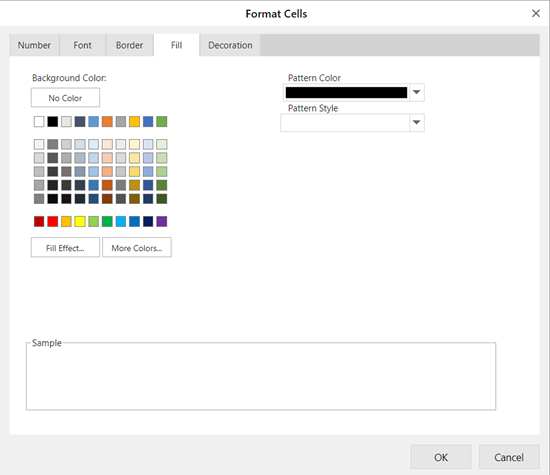
4. <span style="margin: 0px; padding: 0px; user-select: text; -webkit-user-drag: none; -webkit-tap-highlight-color: transparent;" class="NormalTextRun SCXW90506112 BCX0">To edit the mentioned rules, use the</span><span style="margin: 0px; padding: 0px; user-select: text; -webkit-user-drag: none; -webkit-tap-highlight-color: transparent; position: relative; cursor: move; left: 0px; background-repeat: repeat-x; background-position: left bottom; top: 2px; display: inline-block; text-indent: 0px; background-image: var(--urlContextualSpellingAndGrammarErrorV2, url(data:image/svg+xml;base64,PD94bWwgdmVyc2lvbj0iMS4wIiBlbmNvZGluZz0iVVRGLTgiPz4KPHN2ZyB3aWR0aD0iNXB4IiBoZWlnaHQ9IjNweCIgdmlld0JveD0iMCAwIDUgMyIgdmVyc2lvbj0iMS4xIiB4bWxucz0iaHR0cDovL3d3dy53My5vcmcvMjAwMC9zdmciIHhtbG5zOnhsaW5rPSJodHRwOi8vd3d3LnczLm9yZy8xOTk5L3hsaW5rIj4KICAgIDwhLS0gR2VuZXJhdG9yOiBTa2V0Y2ggNTUuMiAoNzgxODEpIC0gaHR0cHM6Ly9za2V0Y2hhcHAuY29tIC0tPgogICAgPHRpdGxlPmdyYW1tYXJfZG91YmxlX2xpbmU8L3RpdGxlPgogICAgPGRlc2M+Q3JlYXRlZCB3aXRoIFNrZXRjaC48L2Rlc2M+CiAgICA8ZyBpZD0iZ3JhbW1hcl9kb3VibGVfbGluZSIgc3Ryb2tlPSJub25lIiBzdHJva2Utd2lkdGg9IjEiIGZpbGw9Im5vbmUiIGZpbGwtcnVsZT0iZXZlbm9kZCIgc3Ryb2tlLWxpbmVjYXA9InJvdW5kIj4KICAgICAgICA8ZyBpZD0iR3JhbW1hci1UaWxlLUNvcHkiIHN0cm9rZT0iIzMzNTVGRiI+CiAgICAgICAgICAgIDxwYXRoIGQ9Ik0wLDAuNSBMNSwwLjUiIGlkPSJMaW5lLTItQ29weS0xMCI+PC9wYXRoPgogICAgICAgICAgICA8cGF0aCBkPSJNMCwyLjUgTDUsMi41IiBpZD0iTGluZS0yLUNvcHktMTEiPjwvcGF0aD4KICAgICAgICA8L2c+CiAgICA8L2c+Cjwvc3ZnPg==)); border-bottom: 1px solid transparent; color: rgb(0, 0, 0); font-family: Calibri, Calibri_MSFontService, sans-serif; font-size: 14.6667px; font-style: normal; font-variant-ligatures: normal; font-variant-caps: normal; font-weight: 400; letter-spacing: normal; orphans: 2; text-align: left; text-transform: none; white-space: pre-wrap; widows: 2; word-spacing: 0px; -webkit-text-stroke-width: 0px; background-color: rgb(255, 255, 255); text-decoration-thickness: initial; text-decoration-style: initial; text-decoration-color: initial; width: 36px; height: 31px; transform: rotate(0deg);" role="presentation" class="WACImageContainer NoPadding DragDrop BlobObject ContextualSpellingAndGrammarErrorV2Themed SCXW90506112 BCX0">![](data:image/png;base64,iVBORw0KGgoAAAANSUhEUgAAACUAAAAeCAYAAACrI9dtAAAAAXNSR0IArs4c6QAAAARnQU1BAACxjwv8YQUAAAAJcEhZcwAAEnQAABJ0Ad5mH3gAAAIaSURBVFhH7ZbJiuJgGEVv2gEEFUccQATduBOcccCFL+Cb9Tv0U7QbUUR0Jy6cFV04gCCICyfU6v7+Shqry6pOdYxk4QGJfwh4uN9guO8/f7xAYXAvv+G/K4Zv/FVRPKXEokiphzb6drvFaDRCvV7HfD5HIBBAOp2G0+mESqXin3pgUpfLBcvlEo1GA+12G4vFgslVq1VsNhv+qVceIrXf75nEbDZjaQmp7HY7NJtNrNdrdhaQXep4PGIwGKBQKKDVasHj8cDv90Ov18NoNCIUCsFkMvFPvyJrT53PZ3S7XZTLZfR6PXb2+XwIBoOYTqewWCxIpVLseo2sUtQ7xWIR/X4fh8OB3dNoNEwsn8/D6/W+aXAB2conCA2HQ1ZCAYPBwKTMZvNNIeLuUhT8tRA1uVAMq9WKWCyGeDzO+ukj7lq+0+nEeqhUKr0TstlsiEQiiEajbC+p1Wp2/xZ3k6KeoSm7JWS32xEOh5mUy+X6VIi4S/lo31AzVyoVJkbnv4Xo86+EBCRLkQAlQ5uZxp4SEqCSCQm53W42eWKQLDWZTFCr1VgvkaAA7R4Soh4SU7JrJEvRpHU6nTdCtKEpnUQi8WUhQrLUarX6sxg5jmOjTukkk0k4HI4Pd9FnSJaif3+SoR8nIdpB2Wz23evIV5AspdVqodPpWCqZTAa5XI5NHIn+Lw99yROL5KTk4CkllqeUWLjxeKyw6QN+AaciBy/3J2uUAAAAAElFTkSuQmCC)</span><span style="margin: 0px; padding: 0px; user-select: text; -webkit-user-drag: none; -webkit-tap-highlight-color: transparent;" data-ccp-charstyle="Hyperlink" class="NormalTextRun SCXW90506112 BCX0"> </span><span style="margin: 0px; padding: 0px; user-select: text; -webkit-user-drag: none; -webkit-tap-highlight-color: transparent;" class="NormalTextRun SCXW90506112 BCX0">icon from the Style column that opens the Format Cells dialog box.</span><span style="margin: 0px; padding: 0px; user-select: text; -webkit-user-drag: none; -webkit-tap-highlight-color: transparent; color: rgb(0, 0, 0); font-size: 11pt; font-style: normal; font-variant-ligatures: normal; font-variant-caps: normal; font-weight: 400; letter-spacing: normal; orphans: 2; text-align: left; text-indent: 0px; text-transform: none; white-space: pre-wrap; widows: 2; word-spacing: 0px; -webkit-text-stroke-width: 0px; background-color: rgb(255, 255, 255); text-decoration-thickness: initial; text-decoration-style: initial; text-decoration-color: initial; line-height: 19.425px; font-family: Calibri, Calibri_EmbeddedFont, Calibri_MSFontService, sans-serif;" data-ccp-props="{201341983:0,335559739:160,335559740:259}" class="EOP SCXW90506112 BCX0"> </span>
    ![rule-format](https://gcdocumentsitekrblob.blob.core.windows.net/document-site-files/images/df1fe1ee-eb3c-4da7-8c20-a0d8d2b7e734/rule-format.ba4143.png?width=500)
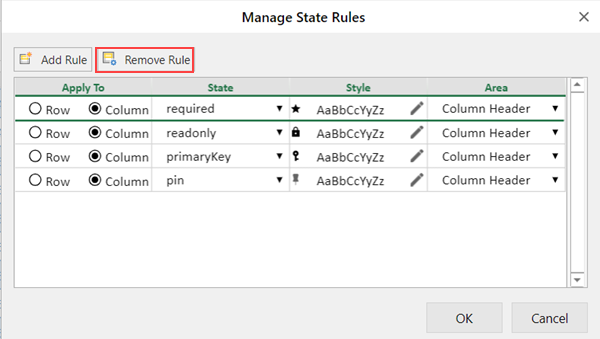
5. To remove the icon from the selected column header, use the **Remove Rule** button.
    ![remove-state-rules](https://gcdocumentsitekrblob.blob.core.windows.net/document-site-files/images/df1fe1ee-eb3c-4da7-8c20-a0d8d2b7e734/remove-state-rules.db1d30.png?width=500)