# Trial Version and Licensing
## Content
The SpreadJS evaluation version displays a watermark at the lower-right corner. For example:
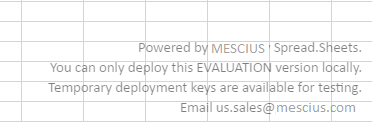
To update your JavaScript to use the licensed version, you must download and extract the licensed JavaScript from the link included in your email from sales-kor@mescius.com.
## Extracting Licensed files
Use the following steps to extract the licensed files:
1. Extract the downloaded `SpreadJS.Release.XX.XXXX.X.zip` to the same location as the trial and replace all existing files at that location.
2. Add a reference to your SpreadJS license that you received when you purchased the product. Add the reference before the workbook is initialized. For example:
```javascript
```
Or
```javascript
licensekey.js file:
GC.Spread.Sheets.LicenseKey = "xxxxxx";
```
> **Note:** If you do not have a trial or production license, SpreadJS can only be used on the local machine (for example: http(s)://localhost or http(s)://127.0.0.1).
## Add-on License
In version 14.1 or later, you can choose to purchase the SpreadJS license along with the Pivot table add-on. The following table describes the product behavior in both the cases:
| Usage Scenario | License Key (SpreadJS and Pivot Table) | License Key (SpreadJS) |
| -------------- | -------------------------------------- | ---------------------- |
| No License Key is used | NA | All SpreadJS features are available and can be run on a local machine. |
| Valid Evaluation License Key is used | All SpreadJS and Pivot Table features are available till the validity of the evaluation license key. | All SpreadJS features are available till the validity of the evaluation license key. |
| Valid Production License Key is used | All SpreadJS and Pivot Table features are available without any limitations. | All SpreadJS features are available without any limitations. |
> **Note:** If the Pivot Table script is added and used locally without a key, a watermark will be displayed. If this script is deployed in your application, it must have a Pivot Table enabled SpreadJS production license key.
### SpreadJS Designer
The SpreadJS Designer is available for 30 days as a trial without a license key.
Select the lock icon and enter your license key to unlock the SpreadJS Designer.
Please note that the SpreadJS Designer application includes the pivot table add-on in version 14.1 or later, by default.
## End-User License Agreement
The MESCIUS licensing information, including the MESCIUS end-user license agreements, frequently asked licensing questions, and the MESCIUS licensing model, is available online at [https://developer.mescius.com/spreadjs/licensing](https://developer.mescius.com/spreadjs/licensing) and [https://developer.mescius.com/legal/eula](https://developer.mescius.com/legal/eula)