# 테이블 시트
## Content
테이블 시트는 **그리드와 유사한 동작**, **스프레드시트 사용자 인터페이스**, **계산 엔진**을 갖춘 고속 데이터 바인딩 테이블 뷰로, **데이터 매니저**를 사용하여 서버에서 데이터를 가져오고, 해당 데이터를 조작한 후 테이블 시트에 바인딩할 수 있는 뷰(view)를 생성합니다.
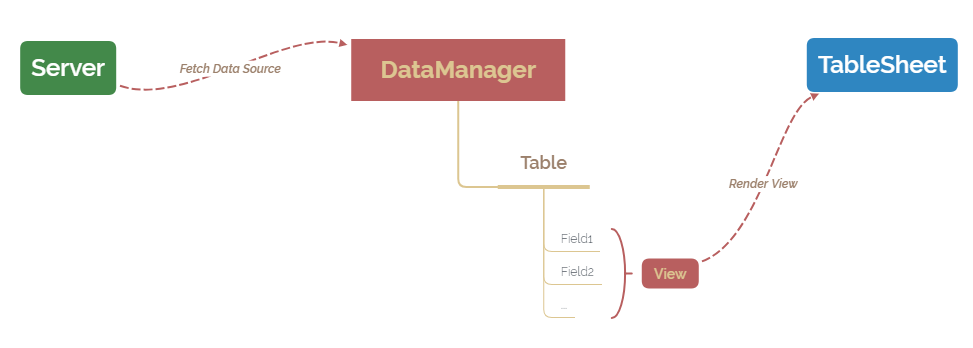
테이블 시트를 사용할 때의 주요 이점은 다음과 같습니다:
* 더 나은 시트 바인딩으로 인해 **정렬 및 필터 성능이 향상됨**
* 그룹 수준 계산 및 슬라이서를 지원하는 **그룹 블록 기능 제공**
* **런타임 패널**을 통해 열 및 그룹 구성 조정 가능
* 스프레드시트 셀 값이 아닌 **데이터에 기반한 조건부 서식 및 규칙** 사용 가능
테이블 시트는 [GC.Spread.Sheets.TableSheet.TableSheet](/spreadjs/api/v18/classes/GC.Spread.Sheets.TableSheet.TableSheet) 및 [GC.Data.DataManager](/spreadjs/api/v18/classes/GC.Data.DataManager) 클래스를 사용하여 생성할 수 있습니다. 데이터 매니저는 **강력한 로컬 데이터 엔진**으로, 데이터베이스와 상호작용하여 데이터를 가져오고, 이를 관리하며, 실시간 데이터 동기화를 수행합니다.
또한, 가져온 데이터를 기반으로 테이블 시트에 바인딩할 수 있는 뷰를 생성합니다.
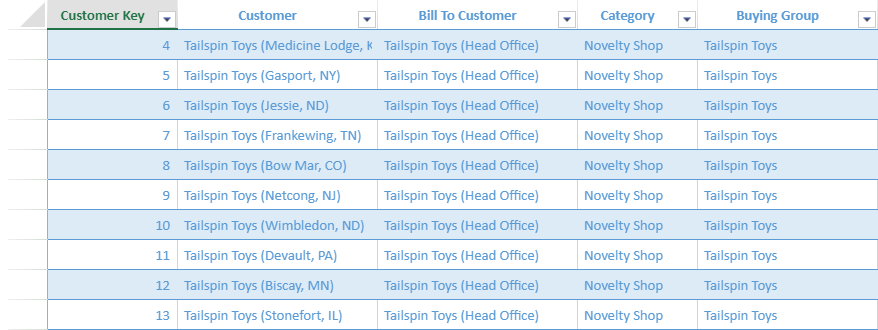
다음 이미지는 **상품 수입 및 유통 회사**를 위한 테이블 시트의 예를 보여줍니다.
## 테이블 시트 기능
테이블 시트 및 다양한 기능을 사용하려면 아래 항목을 참조하세요:
| 기능 | 설명 |
| --- | --- |
| [테이블 시트 구성요소](/spreadjs/docs/v18/features/tablesheet/tablesheet-components) | 테이블 시트의 구조와 구성 요소 설명 |
| [데이터 매니저](/spreadjs/docs/v18/features/tablesheet/data-manager) | 데이터 매니저의 작동 방식 및 메서드 설명 |
| [테이블 시트 생성](/spreadjs/docs/v18/features/tablesheet/create-tablesheet) | 코드로 스프레드시트에 테이블 시트 생성 |
| [테이블 시트 뷰](/spreadjs/docs/v18/features/tablesheet/tablesheet-views) | 테이블 시트 열 표시 방식 제어 및 사용자 정의:- 열 헤더 스타일
- 열 헤더 맞춤 모드
- 셀 유형 및 드롭다
|
| [데이터 작업](/spreadjs/docs/v18/features/tablesheet/data-operations) | 다양한 동기화 모드로 데이터 소스를 효율적으로 편집 |
| [테이블 시트 관계](/spreadjs/docs/v18/features/tablesheet/tablesheet-relationships) | 데이터 매니저를 통한 테이블 및 필드 관계 정의 및 생성 |
| [테이블 시트 작업](/spreadjs/docs/v18/features/tablesheet/tablesheet-operations) | 테이블 시트에서 다양한 작업 수행:- [고정 / 고정 해제](/spreadjs/docs/v18/features/tablesheet/tablesheet-operations/tablesheet-pin-unpin)
- [정렬과 필터](/spreadjs/docs/v18/features/tablesheet/tablesheet-operations/tablesheet-sort-filter)
- [행 동작](/spreadjs/docs/v18/features/tablesheet/tablesheet-operations/tablesheet-row-action)
- [행 동작 명령](/spreadjs/docs/v18/features/tablesheet/tablesheet-operations/row-action-command)
- [행 번호 표사](/spreadjs/docs/v18/features/tablesheet/tablesheet-operations/show-row-number)
- [그룹화](/spreadjs/docs/v18/features/tablesheet/tablesheet-operations/tablesheet-grouping)
- [재정렬](/spreadjs/docs/v18/features/tablesheet/tablesheet-operations/reorder)
- [실행취소 및 다시 샐행](/spreadjs/docs/v18/features/tablesheet/tablesheet-operations/undo-redo)
|
| [규칙](/spreadjs/docs/v18/features/tablesheet/tablesheet-rules) | 테이블 시트에서 조건부 서식 및 스타일 규칙 관리 |
| [외형](/spreadjs/docs/v18/features/tablesheet/tablesheet-appearance) | 테이블 시트의 외관 사용자 정의: |
| [계산](/spreadjs/docs/v18/features/tablesheet/tablesheet-calculations) | 향상된 계산 엔진을 사용하여 계산 열 추가 및 테이블 시트 참조 |
| [상호작용 동작](/spreadjs/docs/v18/features/tablesheet/tablesheet-interactive-behavior) | 다양한 동작으로 테이블 시트와 상호작용- 확대 및 크기 축소
- 열 크기 조절
- 잘라내기, 복사, 붙여넣기
- 드래그 작업
- 단축키
|
| [테이블 시트 IO](/spreadjs/docs/v18/features/tablesheet/tablesheet-io) | 다양한 파일 형식으로 테이블 시트 내보내기- [JSON serialization](/spreadjs/docs/v18/features/tablesheet/tablesheet-io#json-serialization)
- [Excel files](/spreadjs/docs/v18/features/tablesheet/tablesheet-io#export-excel-files)
- [PDF](/spreadjs/docs/v18/features/tablesheet/tablesheet-io#export-pdf)
- [Print](/spreadjs/docs/v18/features/tablesheet/tablesheet-io#print-tablesheet)
|