# 워크시트 인쇄
## Content
SpreadJS에서는 단일 시트 또는 모든 시트를 인쇄할 수 있습니다.
다음 항목은 SpreadJS에서 인쇄 시 출력되는 콘텐츠입니다:
* 코너, 행 헤더, 열 헤더 또는 뷰포트에서 보이는 행 또는 열
* 셀 텍스트
* 셀 스타일
* 병합
* 오버플로우
다음 항목은 인쇄되지 않습니다:
* 숨겨진 행 또는 열
* 움직이는 개체
* 메모
* 탭 스트립
* 스크롤 바
* 그룹
* 필터 버튼
* 유효성 검사 버튼 또는 강조 원
* 활성 효과
* 선택 영역
* 고정선
시트 또는 시트를 인쇄하려면 [print](/spreadjs/api/v19/classes/GC.Spread.Sheets.Workbook#print) 메서드를 사용합니다. 특정 시트를 지정하려면 인덱스를 사용하고, 모든 표시된 시트를 인쇄하려면 인덱스를 생략합니다. [PrintInfo](/spreadjs/api/v19/classes/GC.Spread.Sheets.Print.PrintInfo) 클래스를 사용하여 헤더, 테두리, 그리드라인 등을 인쇄할지 여부 등 다양한 인쇄 옵션을 지정할 수 있습니다.
다음 표는 인쇄 헤더 또는 바닥글을 생성할 때 사용할 수 있는 옵션을 나타냅니다:
| **제어 문자** | **설명** | **예시** | **결과** |
| ----- | --- | --- | --- |
| & | 이스케이프 문자 | | |
| P | 현재 페이지 | `sheet.printInfo().headerLeft("This is page &P of &N pages.");` | This is page 1 of 10 pages. (전체 10페이지 중 첫 번째 페이지일 경우) |
| N | 총 페이지 수 | `sheet.printInfo().headerLeft("This is page &P of &N pages.");` | This is page 1 of 10 pages. |
| D | 현재 날짜 | `sheet.printInfo().headerLeft("It is &D.");` | It is 2015/6/19. (현재 날짜가 June 19, 2015이라면) |
| T | 현재 시간 | `sheet.printInfo().headerLeft("It is &T."` | It is 16:30:36. (16:30:36 이 현재라면) |
| G | 이미지 | `var printInfo = new GC.Spread.Sheets.Print.PrintInfo();`
`printInfo.headerLeft("&G");`
`printInfo.headerLeftImage("logo.jpg");` | 이미지 표시 |
| S | 취소선 | `sheet.printInfo().headerLeft("&SThis is text.");` | ~~This is text.~~ |
| U | 밑줄 | `sheet.printInfo().headerLeft("&UThis is text.");` |  |
| B | 굵게 | `sheet.printInfo().headerLeft("&BThis is text.");` | **This is text.** |
| I | 이탤릭체 | `sheet.printInfo().headerLeft("&IThis is text.");` | *This is text.* |
| | 글꼴 크기 | `sheet.printInfo().headerLeft("&36This is text.");` | 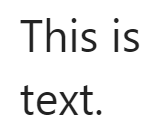 |
| " | 글꼴 접두어 | `sheet.printInfo().headerLeft("&\"Lucida Console\"This is text.");` | 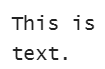 |
| K | 색상 접두어 | `sheet.printInfo().headerLeft("&KFF0000This is text.");` |  |
| F | Spread 이름 | `sheet.printInfo().headerLeft("spead name: &F");` | spread name: testSpread (인쇄될 스프레드 이름이 "testSpread"이라면.) |
| A | 시트 이름 | `sheet.printInfo().headerLeft("sheet name: &A");` | sheet name: Sheet1 (인쇄될 시트의 이름이"Sheet1"이라면.) |
[orientation](/spreadjs/api/v19/classes/GC.Spread.Sheets.Print.PrintInfo#orientation) 메서드는 Excel 가져오기 또는 내보내기 시에만 지원됩니다. [paperSize](/spreadjs/api/v19/classes/GC.Spread.Sheets.Print.PrintInfo#paperSize) 메서드는 페이징 결과에만 적용되며, 프린터 설정에는 적용되지 않습니다. 인쇄 미리보기는 지원되지 않으며, 브라우저에 따라 인쇄 결과가 다를 수 있습니다.
>type=warning
> **참고:** 인쇄 기능을 사용하려면 인쇄 모듈(gc.spread.sheets.print...\*.min.js)을 페이지에 추가해야 합니다.
다음 코드는 시트를 인쇄하는 예제입니다:
```JavaScript
...
// SpreadJS 초기화
var spread = new GC.Spread.Sheets.Workbook(document.getElementById("ss"),{sheetCount:3});
var activeSheet = spread.getActiveSheet();
activeSheet.suspendPaint();
// 값 설정
for (var r = 0, rc = activeSheet.getRowCount() - 5; r < rc; r++) {
for (var c = 0, cc = activeSheet.getColumnCount() - 5; c < cc; c++) {
activeSheet.setValue(r, c, r + c);
}
}
activeSheet.resumePaint();
$("#button1").click(function () {
spread.print(0);
});
```