# 멀티컬럼(MultiColumn) ComboBox
## Content
기본적으로 \_\_ComboBox\_\_는 드롭다운 목록에 행당 하나의 항목을 표시합니다.
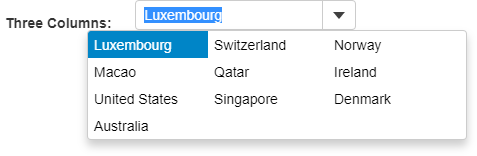
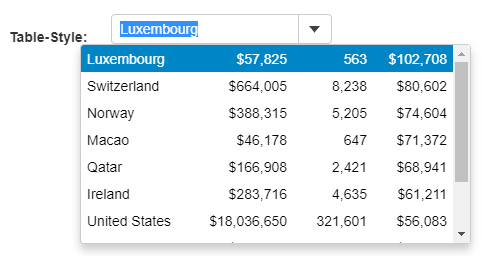
짧은 항목이 많은 경우, 화면 공간을 경제적으로 사용하기 위해 드롭다운에 여러 열을 표시할 수 있습니다. 약간의 CSS와 **dropDownCssClass** 속성을 사용하여 이를 수행할 수 있습니다. 또는 항목이 복잡한 객체인 경우, 행당 단일 항목을 렌더링할 수 있지만 테이블이나 그리드의 경우와 같이 세부 사항이 추가됩니다. **formatItem** 이벤트나 **headerPath** 속성을 사용하여 이를 수행할 수 있습니다.
아래 예시에서는 두 개의 ComboBox 컨트롤을 보여줍니다. 하나는 CSS 클래스를 사용하여 여러 열을 표시하고 다른 하나는 테이블 스타일로 세부 정보를 표시하기 위해 여러 열을 표시합니다.
##### HTML
```html
```
##### CSS
```css
.cb-flex {
display: flex;
flex-wrap: wrap;
width: 380px;
}
.cb-flex .wj-listbox-item {
width: 120px;
white-space: pre;
overflow: hidden;
text-overflow: ellipsis;
}
.wj-listbox-item table {
table-layout: fixed;
}
.wj-listbox-item td {
width: 120px;
white-space: pre;
overflow: hidden;
text-overflow: ellipsis;
}
.wj-listbox-item td.number {
width: 80px;
text-align: right;
}
```
##### Javascript
```javascript
import * as wijmo from '@mescius/wijmo';
import * as input from '@mescius/wijmo.input';
import { getData } from './data';
function init() {
// multi-column CSS
let theComboCSS = new input.ComboBox('#theComboCSS', {
dropDownCssClass: 'cb-flex',
displayMemberPath: 'country',
itemsSource: getData()
});
//
// multi-column table-style
let template = '