


Connection Class
Connection은 Client 클래스의 connect 메서드가 반환하는 객체로, 서버와의 양방향 연결을 나타냅니다. 이 가이드는 다음 내용을 다룹니다.
메시지 송수신
이벤트 수신
연결 관리
속성
id
각 연결에는 무작위로 생성된 20자 길이의 식별자가 할당됩니다.
이 식별자는 서버 측 값과 동기화됩니다.
이 ID는 재연결이 발생하더라도 변경되지 않습니다.
// 클라이언트 측
connection.on("connect", () => {
    console.log(connection.id); // 예시 출력: xkSF0EEI7AieftPstmPa
});
connection.on("reconnect", () => {
    console.log(connection.id); // 예시 출력: xkSF0EEI7AieftPstmPa
});
// 서버 측
server.on("connect", ({ connection }) => {
console.log(connection.id); // 예시 출력: xkSF0EEI7AieftPstmPa
});roomId
해당 연결이 속한 룸의 ID입니다.
console.log(connection.roomId); // 예시 출력: "room1"connected
현재 서버와 연결되어 있는지 여부를 나타냅니다.
connection.on("connect", () => {
    console.log(connection.connected); // true
});
connection.on("disconnect", () => {
    console.log(connection.connected); // false
});
라이프사이클
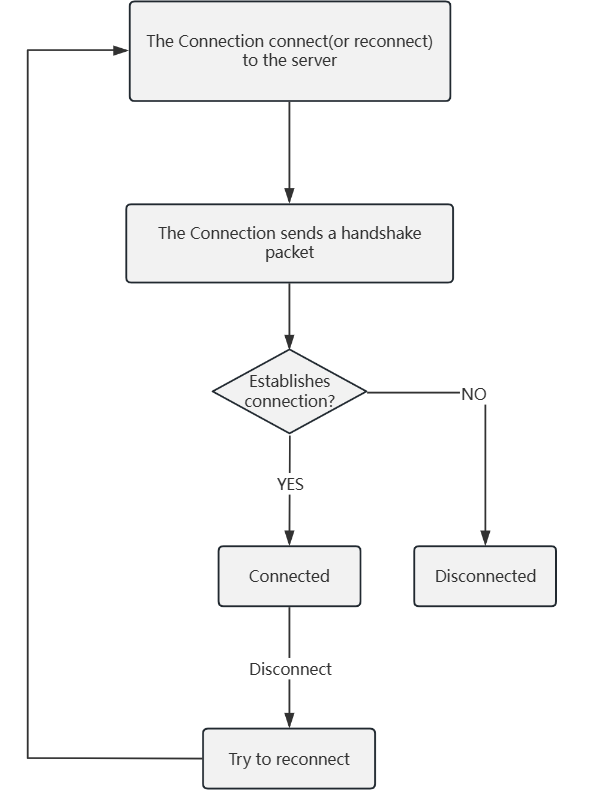
메서드
send
send 메서드를 사용하여 서버로 메시지를 전송할 수 있습니다.
connection.send('Hello, server!');
connection.send('Hello, server!', 'document');
connection.send({ userId: 'user1', active: true });
connection.send({ userId: 'user1', active: true }, 'my-presence');
매개변수
data: 전송할 데이터type(선택): 메시지의 목적이나 분류를 식별하기 위한 메시지 타입
예제
// 문서 업데이트 전송
connection.send({ content: 'New paragraph' }, 'my-document');
// 온라인 상태 전송
connection.send({ userId: 'user1', active: true }, 'my-presence');
// 메시지 수신 및 구분
connection.on('message', (data, type) => {
    if (type === 'my-document') {
        console.log('문서 업데이트:', data);
    } else if (type === 'my-presence') {
        console.log('상태 업데이트:', data);
    }
});
close
close 메서드를 사용하여 연결을 종료합니다.
connection.close();on
이벤트 리스너를 추가합니다.
connection.on('connect', () => {
    console.log('서버에 연결되었습니다');
});
connection.on('message', (data, type) => {
    console.log('수신된 메시지:', data, '타입:', type);
});
once
한 번만 실행되고 자동으로 제거되는 이벤트 리스너를 추가합니다.
connection.once('reconnect', (attempts) => {
    console.log(`재연결 시도 횟수 #${attempts}`);
});
off
이벤트 리스너를 제거합니다.
const handler = () => console.log('오류 발생');
connection.on('error', handler);
connection.off('error', handler);
이벤트
지원되는 이벤트
이벤트 이름 | 설명 | 매개변수 |
|---|---|---|
| 연결이 설정되었을 때 트리거됨 | 없음 |
| 메시지를 수신했을 때 트리거됨 |
|
| 연결이 해제되었을 때 트리거됨 |
|
| 오류가 발생했을 때 트리거됨 |
|
| 재연결 시도 중 트리거됨 |
|
| 재연결에 성공했을 때 트리거됨 |
|
| 재연결에 실패했을 때 트리거됨 | 없음 |
연결 해제 사유
다음 표는 disconnect 이벤트의 연결 해제 사유를 나타냅니다.
값 | 설명 |
|---|---|
| 클라이언트가 직접 연결을 해제함 |
| 서버가 직접 연결을 해제함 |
| 클라이언트가 제한 시간 내 ping에 응답하지 않음 |
| 전송 계층 연결이 종료됨 |
| 전송 계층 오류 발생 |