


튜토리얼: 실시간 동시 작업 SpreadJS
이 튜토리얼에서는 실시간 동시 작업이 가능한 SpreadJS를 생성하는 과정을 안내합니다. 사용자는 동일한 룸에서 워크북을 동시에 편집할 수 있으며, 모든 변경 사항은 다른 클라이언트와 실시간으로 동기화됩니다.
미리 보기
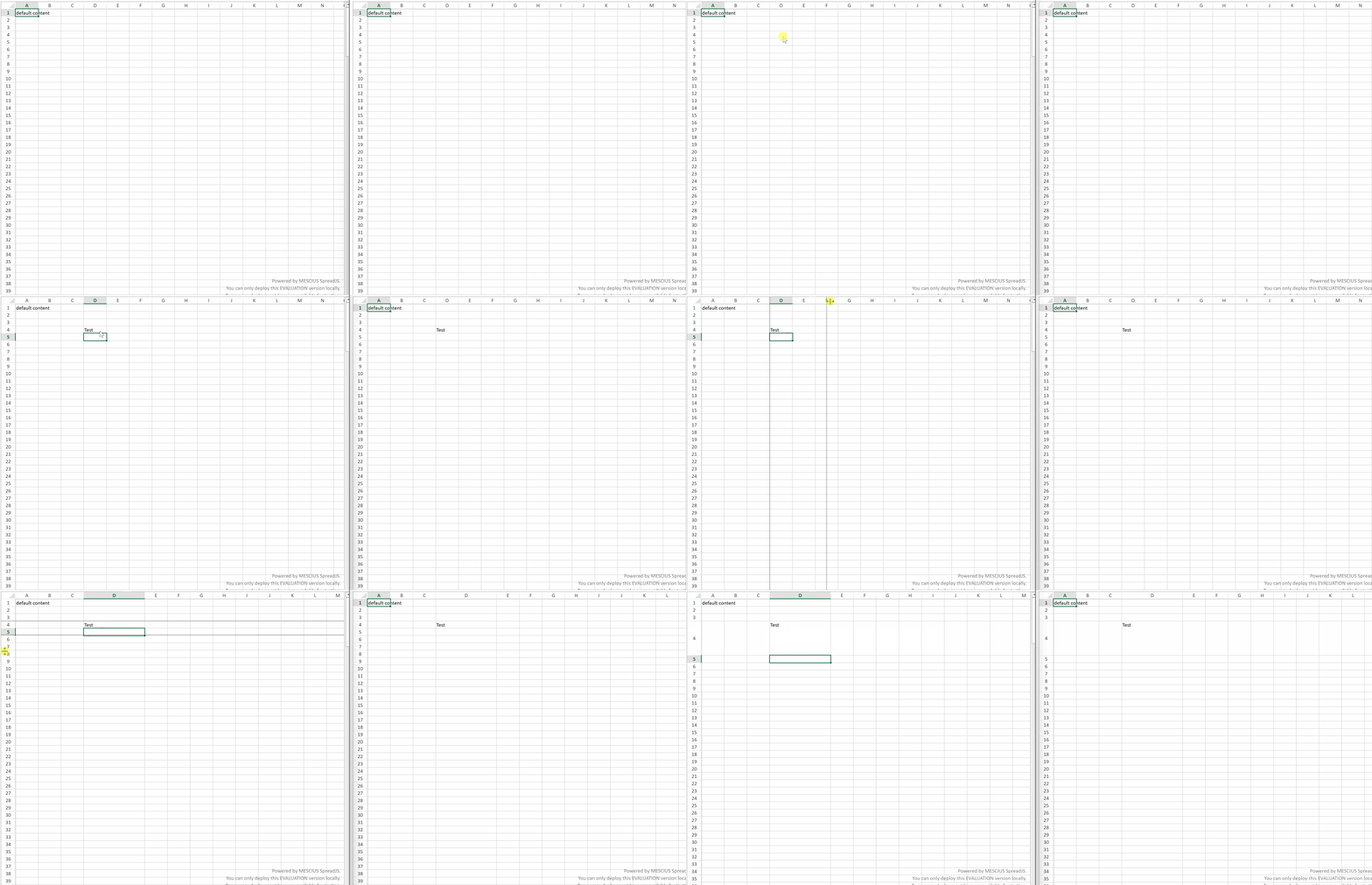
다음 그림과 같이 모든 동기화 작업을 확인할 수 있습니다.
세부 단계
1단계: 프로젝트 초기화
프로젝트 폴더 생성
컴퓨터에
spread-collaboration과 같은 새 폴더를 생성하고 해당 폴더로 이동합니다.mkdir spread-collaboration cd spread-collaborationNode.js 프로젝트 초기화
다음 명령을 실행하여
package.json파일을 생성합니다.npm init -ypackage.json을 편집하고 다음 스크립트를 추가합니다.{ "name": "spread-collaboration", "version": "1.0.0", "type": "module", "scripts": { "start": "node server.js", "build": "webpack" }, "dependencies": {} }의존성 설치
서버와 클라이언트에 필요한 npm 패키지를 설치합니다.
npm install @mescius/js-collaboration @mescius/js-collaboration-ot
npm install @mescius/js-collaboration-client @mescius/js-collaboration-ot-client
npm install @mescius/spread-sheets-collaboration @mescius/spread-sheets-collaboration-client
npm install @mescius/spread-sheets @mescius/spread-sheets-collaboration-addon
npm install express
프런트엔드 번들링 도구에 필요한 npm 패키지를 설치합니다.
npm install webpack webpack-cli --save-devstyle-loader와css-loader를 사용합니다.npm install --save-dev style-loader npm install --save-dev css-loaderWebpack 설정 파일 생성
프로젝트 루트 디렉터리에
webpack.config.js를 생성하고 다음 내용을 추가합니다.import path from "path"; import { fileURLToPath } from "url"; const __dirname = path.dirname(fileURLToPath(import.meta.url)); export default { entry: './public/client.js', // 진입 파일 output: { path: path.resolve(__dirname, 'public'), // public 디렉터리로 출력 filename: 'client.bundle.js' // 출력 파일명 }, mode: 'development', module: { rules: [ { test: /\.css$/i, use: ["style-loader", "css-loader"], }, ], }, };public 디렉터리 및 빈 파일 생성
프로젝트 루트에 public 디렉터리와
server.js파일을 생성합니다. public 디렉터리 안에는index.html,styles.css파일을 생성합니다. 디렉터리 구조는 다음과 같습니다./ (프로젝트 루트 디렉터리) │── node_modules/ # 의존성 모듈 디렉터리 │── public/ # 공개 리소스 디렉터리 │ ├── client.js # 클라이언트 측 코드 │ ├── index.html # 진입 HTML 파일 │── package.json # 프로젝트 설정 파일 │── server.js # 서버 측 코드 │── webpack.config.js # Webpack 설정 파일
2단계: 서버 설정
서버 생성
server.js 파일에 다음 코드를 추가합니다.
import express from 'express';
import http from 'http';
import { Server } from '@mescius/js-collaboration';
import * as OT from '@mescius/js-collaboration-ot';
import { type } from '@mescius/spread-sheets-collaboration';

// 타입 등록
OT.TypesManager.register(type);

const app = express();
const httpServer = http.createServer(app);
const server = new Server({ httpServer });
const port = 8080;

// OT 문서 서비스 초기화
const documentServices = new OT.DocumentServices();
server.useFeature(OT.documentFeature(documentServices));

// 정적 리소스 제공
app.use(express.static('public'));

// 서버 시작
httpServer.listen(port, () => {
    console.log(`Server listening on port ${port}`);
    console.log(`http://127.0.0.1:${port}/index.html`);
});
코드 설명:
OT.TypesManager.register를 사용하여 SpreadJS 타입을 등록하고, SpreadJS OT 작업을 지원합니다.
OT.DocumentServices는 기본 OT 문서 관리 기능을 제공합니다.
server.useFeature(OT.documentFeature())를 통해 OT 기능을 활성화합니다.
3단계: 클라이언트 설정
클라이언트는 SpreadJS, js-collaboration-ot-client, spread-sheets-collaboration-client를 사용하여 실시간 동기화를 구현합니다.
HTML 파일 작성 (
public/index.html)
<!DOCTYPE html>
<html lang="en">
<head>
    <meta charset="UTF-8">
    <title>SpreadJS Collaboration</title>
    <script src="/client.bundle.js"></script>
</head>
<body>
    <div id="ss" style="width:100vw;height:95vh;border:1px solid darkgray;float:left"></div>
</body>
</html>
클라이언트 JavaScript 작성 (
public/client.js)
import * as GC from '@mescius/spread-sheets'
import '@mescius/spread-sheets-collaboration-addon';
import { Client } from "@mescius/js-collaboration-client";
import * as OT from "@mescius/js-collaboration-ot-client";
import { type, bind } from '@mescius/spread-sheets-collaboration-client';
import "@mescius/spread-sheets/styles/gc.spread.sheets.excel2013white.css";

// 타입 등록
OT.TypesManager.register(type);
window.onload = async function() {
    const workbook = new GC.Spread.Sheets.Workbook('ss');
    // 서버에 연결하고 룸에 참여
    const conn = new Client().connect('room1');
    const doc = new OT.SharedDoc(conn);
    // 오류 감시
    doc.on('error', (err) => console.error(err));
    await doc.fetch();
    // 문서가 존재하지 않는 경우 초기 콘텐츠 생성
    if (!doc.type) {
        workbook.getActiveSheet().getCell(0, 0).value("default content");
        await doc.create(workbook.collaboration.toSnapshot(), type.uri, {});
        bind(workbook, doc);
    } else {
        bind(workbook, doc);
    }
}
코드 설명:
OT.SharedDoc를 사용하여 공유 문서를 관리하고 워크북과 통합합니다.
bind를 사용하여 문서와 워크북을 바인딩합니다. 수동 바인딩은 SpreadJS Sheets Collaboration packages를 참고하십시오.
문서가 존재하지 않으면 doc.create를 사용해 생성합니다.
4단계: 실행 및 테스트
클라이언트 코드 번들링
npm run build서버 시작
npm run start서버가 http://localhost:8080 에서 실행 중이라는 메시지가 표시됩니다.
기능 테스트
브라우저에서
http://127.0.0.1:8080/index.html접속동일한 주소를 여러 창에서 열고 콘텐츠를 편집하여 실시간 동기화를 확인합니다.
다음 단계
SpreadJS에 영구 저장 기능 추가: 튜토리얼: 데이터베이스 어댑터 사용
SpreadJS에 사용자 Presence 상태(예: 선택 영역) 실시간 표시 기능 추가: 튜토리얼: Presence 사용
사용자별 작업 권한 구성: 튜토리얼: 권한 사용
동시 작업 클라이언트와 서버를 독립 프로젝트로 배포: 튜토리얼: 동시 작업 클라이언트와 서버 분리 배포