


컨텍스트 메뉴 사용자 지정
스케줄러는 유효한 셀과 이벤트 항목에 대해 컨텍스트 메뉴를 엽니다. 일반적인 작업에는 기본 제공 명령을 사용하고, 애플리케이션에 추가 명령이 필요한 경우 사용자 지정 SchedulerMenu를 지정하세요.
기본 제공 메뉴 이해하기
셀이나 이벤트 항목에 포커스가 있을 때 마우스 또는 Shift+F10과 같은 플랫폼의 컨텍스트 메뉴 명령으로 메뉴를 열 수 있습니다.
대상 | 사용 가능한 명령 | 화면 예시 |
|---|---|---|
셀 | 추가(Add), 오늘(Today) |
|
이벤트 항목 | 편집(Edit), 삭제(Delete), 오늘(Today) |
|
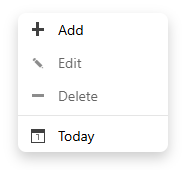
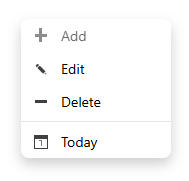
대상에 적용되지 않는 명령도 메뉴에 표시되지만 비활성화됩니다. 추가는 셀의 시간 범위와 리소스 값을 사용합니다. 편집과 삭제는 원본 항목에 적용됩니다. 오늘은 스케줄러에 구성된 시간대의 현재 날짜로 이동합니다. 메뉴를 닫으면 포커스가 대상 요소로 돌아갑니다.
사용자 지정 메뉴 만들기
SchedulerMenu를 상속하고 메뉴 항목을 정의한 다음 인스턴스를 scheduler.contextMenu에 할당합니다.
class CustomSchedulerMenu extends wjScheduler.SchedulerMenu {
  constructor(element: HTMLElement, scheduler: wjScheduler.FlexScheduler) {
    super(element, scheduler);
    this.itemsSource = [
      { text: 'Add event', action: wjScheduler.SchedulerMenuAction.Add, icon: 'wj-glyph-plus' },
      { text: 'Create focus block', action: 'focusBlock', icon: 'wj-glyph-calendar' },
      { text: 'Edit event', action: wjScheduler.SchedulerMenuAction.Edit, icon: 'wj-glyph-pencil' },
      { text: 'Delete event', action: wjScheduler.SchedulerMenuAction.Delete, icon: 'wj-glyph-minus' },
      { text: 'Go to today', action: wjScheduler.SchedulerMenuAction.Today, icon: 'wj-glyph-circle' },
    ];
  }

  canExecute(action: string | number): boolean {
    if (typeof action === 'number') {
      return super.canExecute(action);
    }
    return action === 'focusBlock' &&
      this.hitTestType === wjScheduler.SchedulerHitTestType.Cell;
  }

  executeContextMenuAction(action: string | number): void {
    if (typeof action === 'number') {
      super.executeContextMenuAction(action);
      return;
    }
    if (action === 'focusBlock') {
      const info = this.hitInfo;
      if (!info || this.hitTestType !== wjScheduler.SchedulerHitTestType.Cell) {
        return;
      }
      this.scheduler.create({
        subject: 'Focus block',
        start: info.start,
        end: info.end,
        ...info.resources,
      });
    }
  }
}

const menuHost = document.createElement('div');
document.body.appendChild(menuHost);
scheduler.contextMenu = new CustomSchedulerMenu(menuHost, scheduler);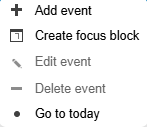
명령 상태 제어하기
현재 대상에 따라 명령의 활성화 여부를 결정하려면 canExecute를 재정의합니다. 기본 추가, 편집, 삭제, 오늘 규칙을 유지하려면 숫자형 기본 제공 액션에 대해 기본 구현을 호출하세요.
hitTestType을 사용해 셀인지 이벤트 항목인지 구분합니다. hitInfo에는 대상의 시간 범위, 원본 항목, 리소스 값이 포함됩니다. 이 속성은 메뉴가 열려 있는 동안 현재 메뉴 대상에 대한 정보를 제공합니다.
다음 예제에서는 메뉴를 셀에서 열었을 때만 애플리케이션에서 정의한 focusBlock 액션을 활성화합니다. false를 반환하면 명령은 메뉴에 표시되지만 비활성화됩니다.
canExecute(action: wjScheduler.SchedulerMenuAction | string): boolean {
  if (typeof action === 'number') {
    return super.canExecute(action);
  }

  return action === 'focusBlock' &&
    this.hitTestType === wjScheduler.SchedulerHitTestType.Cell;
}
애플리케이션 명령 실행하기
사용자 지정 액션을 처리하려면 executeContextMenuAction을 재정의하세요. 작업을 수행할 때는 스케줄러 메서드와 원본 항목을 사용하고, 대상 DOM 요소를 직접 조작하지 마세요.
사용자 지정 액션에서는 this.hitInfo를 통해 컨텍스트 메뉴의 대상 정보를 확인할 수 있습니다. 셀이 대상인 경우 start, end, resources, isWorkingTime이 포함됩니다. 이벤트 항목이 대상인 경우 원본 item, 일치하는 리소스 레코드, conflicts가 포함됩니다. this.hitTestType을 사용하면 대상 유형을 확인할 수 있습니다.
다음 예제에서는 애플리케이션에서 정의한 focusBlock 액션을 처리하고, 기본 제공 액션은 기본 클래스의 메서드에 위임합니다. create에 전달하는 속성 이름은 스케줄러에 설정된 사용자 지정 eventFields 매핑과 일치해야 합니다.
executeContextMenuAction(action: wjScheduler.SchedulerMenuAction | string): void {
  if (typeof action === 'number') {
    super.executeContextMenuAction(action);
    return;
  }

  if (action === 'focusBlock') {
    const info = this.hitInfo;
    if (!info || this.hitTestType !== wjScheduler.SchedulerHitTestType.Cell) {
      return;
    }

    this.scheduler.create({
      title: 'Focus block',
      beginsAt: info.start,
      endsAt: info.end,
      ...info.resources,
    });
  }
}
레이블과 아이콘 사용자 지정하기
메뉴의 각 항목에는 표시 텍스트, 액션 식별자, 아이콘을 지정할 수 있습니다. icon에는 wj-glyph-plus와 같은 Wijmo 글리프 클래스 이름, 이미지 URL 또는 base64 데이터 URI를 사용할 수 있습니다. 스케줄러는 글리프 클래스를 <span>으로, 이미지는 <img>로 렌더링합니다. 지원되는 이미지 형식은 png, jpg, jpeg, gif, webp, bmp, svg, avif입니다. 레이블은 짧게 작성하고 canExecute를 통해 명령 상태를 명확히 표현하세요.
itemsSource를 할당할 때 레이블과 아이콘을 정의합니다. 숫자형 SchedulerMenuAction 값은 기본 제공 명령에 연결되고, 애플리케이션에서 정의한 액션에는 고유한 문자열을 사용할 수 있습니다.
this.itemsSource = [
  {
    text: 'Add event',
    action: wjScheduler.SchedulerMenuAction.Add,
    icon: 'wj-glyph-plus',
  },
  {
    text: 'Create focus block',
    action: 'focusBlock',
    icon: 'wj-glyph-calendar',
  },
  {
    text: 'Delete event',
    action: wjScheduler.SchedulerMenuAction.Delete,
    icon: 'wj-glyph-minus',
  },
];
기본 제공 명령의 레이블은 스케줄러에 설정된 현재 문화권에 따라 표시됩니다. 사용자 지정 명령의 텍스트는 애플리케이션에서 직접 지정합니다.